If you searched for Tune AI, you may be wondering whether the platform is still available, what it actually offered, and whether there is a current alternative worth considering. Tune AI was an AI platform focused on open-source models, fine-tuning, deployment, and AI-powered chat.
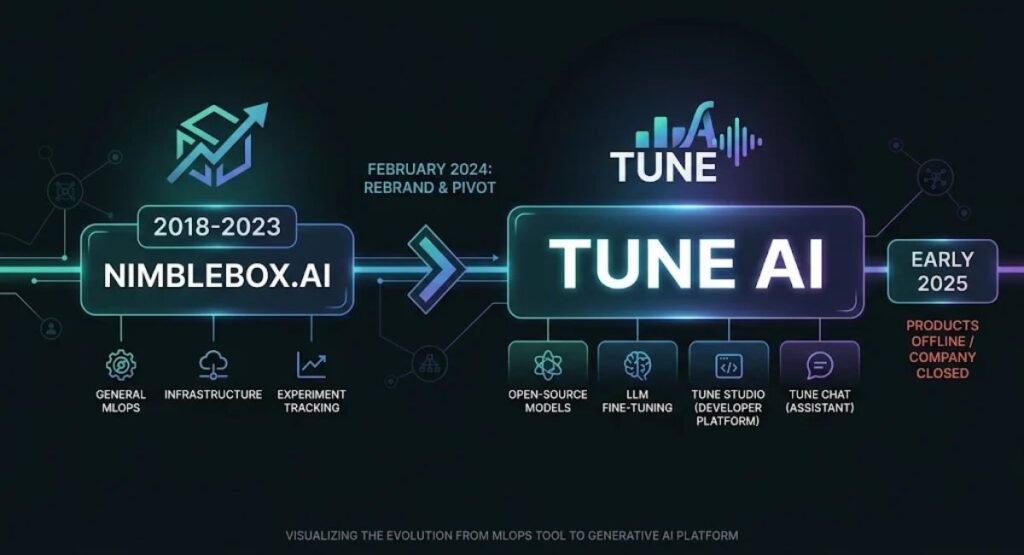
There is one important detail to know first: Tune AI is no longer operating. The company is listed as permanently closed, while its products, including Tune Chat and Tune Studio, went offline in 2025. This guide explains what Tune AI was, how it worked, what features it offered, its historical pricing, and which types of platforms can replace it today.
Tune AI at a Glance
- What it was: a generative AI platform with two main products, Tune Chat (a chat app for working with AI models) and Tune Studio (a developer platform for fine-tuning and deploying open-source LLMs).
- Company background: the company was formerly known as NimbleBox, rebranded to Tune AI in February 2024, and lists 2018 as its founding year on LinkedIn.
- Current status: closed. Its GitHub organization was archived on March 15, 2026.
- Pricing today: none, since there is nothing to buy.
- What to do instead: pick a currently supported platform based on whether you need a chat assistant, model fine-tuning, or hosted deployment.
What Is Tune AI?
Tune AI was both a company and a generative AI platform aimed at helping businesses adopt AI. Its LinkedIn tagline was “Make AI, Your Own,” and its public products included TuneChat, a chat app powered by open-source models, TuneStudio, a playground for developers to fine-tune and deploy LLMs, and ChainFury, an open-source prompt engine. Crunchbase describes Tune Studio as a platform for deploying, managing, and fine-tuning large language models as API endpoints, and Tune Chat as a chat interface for non-technical users.
The problem it tried to solve is real. Off-the-shelf AI models are general-purpose, but businesses often want a model that follows their formatting rules, speaks in their brand voice, or runs inside their own cloud account for privacy reasons. Doing that from scratch takes machine learning engineers, GPU infrastructure, and time. Tune AI packaged those steps into a more approachable platform.
One naming caveat: “Tune AI” is easy to confuse with unrelated products. Tunee AI, for example, is an AI music tool from a different company. If you were looking for an AI music generator, this isn’t the right topic.
A Short History: From NimbleBox to Tune AI
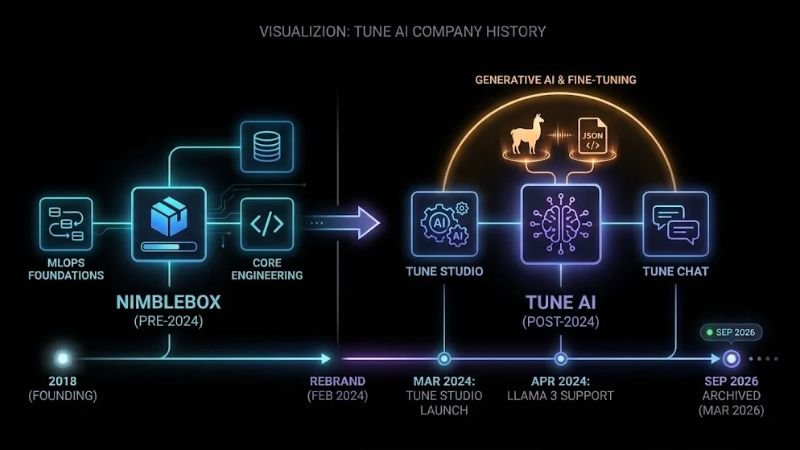
The company’s legal name in Crunchbase is NimbleBox, Inc., and Crunchbase lists Anshuman Pandey, Naman Maheshwari, and Rohan Pooniwala as founders. In February 2024, the company announced on X that NimbleBox AI was becoming Tune AI, describing the change as a statement about its identity and future direction.
Its product timeline tracked the wider AI industry. Tune Studio was announced in March 2024. The company then said Llama 3 8B and 70B models were available on Tune Chat and Studio in April 2024, and Llama 3.1 405B on Tune Studio in July 2024. Adding new open-source models quickly was part of its pitch.
Crunchbase and LinkedIn list San Francisco as the company’s headquarters, and some databases also point to a team near Chennai, India. LinkedIn says the company was backed by Accel, Flipkart Ventures, Together Fund, Speciale Invest, Techstars, and other investors. Funding totals differ widely from one database to the next, so this guide doesn’t cite a single figure.
The ending was quiet. The shutdown date of February 28, 2025 comes from company databases and tool directories rather than a notice this guide could retrieve directly, but the closed status is consistent across Crunchbase and GitHub’s archived organization page.
How Did Tune AI Work?
The platform is offline, so this section describes how it worked based on its own documentation and announcements, not on hands-on testing.
Picture a small US software company that wants a support assistant with a specific tone and a strict reply template. On a platform like Tune Studio, the workflow generally looked like this:
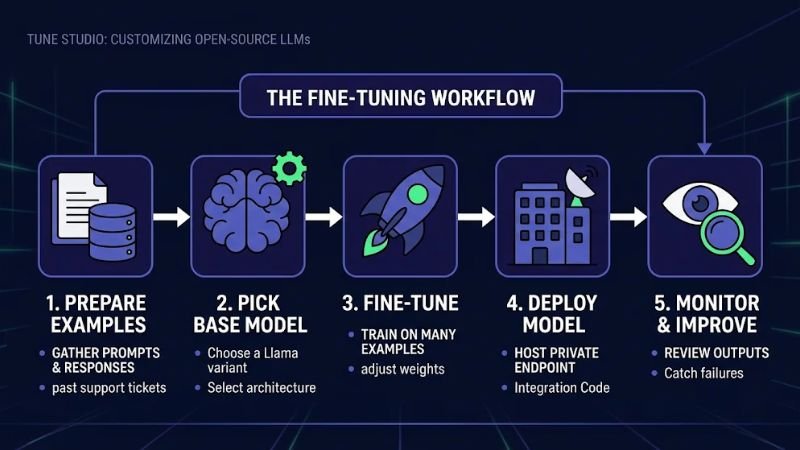
- Pick a base model. Start from an open-source model, such as a Llama variant.
- Prepare examples. Gather ideal prompts and responses, such as past tickets paired with approved answers.
- Fine-tune. Train the base model on those examples so the behavior lives in the model rather than being repeated in every prompt.
- Deploy. Once a job finished, Tune Studio’s documentation said you could deploy the model from the interface and use it in the playground or through its chat completion API.
- Monitor and improve. Review outputs, catch failures, and add examples for edge cases.
The appeal of fine-tuning is easy to explain. Prompting a model with a few examples only goes so far, because a prompt can hold only so much. Microsoft’s documentation on fine-tuning puts it as training on many more examples than fit in a prompt, which can also shorten prompts and reduce latency. In practice, a smaller model tuned for a narrow job can sometimes hold its own against a larger general model, though results vary.
The training step is rarely the hard part. The harder work is assembling examples that are clean, consistent, and representative of what real users will ask. If the examples contradict each other, the tuned model tends to reflect that inconsistency, and no platform can fix a weak dataset for you.
Tune Chat was simpler. You opened a chat app, chose a model, and worked on tasks like drafting content, applying a brand voice, or chatting with a PDF.
Tune AI Features and Platform Capabilities
Instead of a plain feature list, here’s what mattered in practice.
Fine-tuning open-source models
This was the centerpiece. Rather than relying only on prompts, teams could adjust a model with their own examples. A company that needs consistent JSON output or a compliance-friendly tone benefits from behavior that doesn’t drift when prompts get long or messy. This kind of AI model customization is now available from many vendors, which is part of why the category got crowded.
Deployment in your own cloud
Tune Studio was announced as a way to fine-tune and deploy open-source LLMs on your own cloud securely. For US healthcare, finance, and legal teams that don’t want sensitive data leaving their environment, that was the main draw. It doesn’t replace a compliance review, but it addresses a genuine concern about AI deployment.
An LLM playground and model merging
The same launch announcement listed a playground, deployment and fine-tuning, and model merging. A playground lets you compare models before committing, so you can see which one handles your prompt best without writing integration code first. Tune Studio’s documentation also listed a set of supported open-source models, including Llama 3 and Mixtral variants.
Multimodal deployment and function calling
Tune Studio’s API reference described text, image, audio, video, and combined image-and-text modalities for models, so it wasn’t limited to text. The documentation also covered function calling and Tune Assistant, which paired a function-calling model with tools such as web search and image generation. Function calling matters if you’re building an AI agent that triggers actions, like looking up an order or creating a ticket.
Logging
Tune Studio’s logging documentation described logs as a way to assess model performance and identify problems, available for custom private models you deployed. It’s the unglamorous side of AI workflows, but you can’t improve what you can’t observe.
A chat app for open-source models
On the Tune Chat side, LinkedIn posts promoted content creation, brand voice, chatting with PDFs, and testing open-source models in one place. That made it a general-purpose AI chat tool rather than something built for a single job.
Who Was Tune AI For?
Developers and ML engineers were the core audience for Tune Studio. If you were comfortable with APIs and datasets, the platform cut down infrastructure work.
US startups and product teams building AI-powered features, like a support bot or an internal search assistant, could prototype without a dedicated ML team.
Regulated organizations were a stated target, since the company emphasized deployment in the customer’s own cloud.
Marketers and creators were the audience for Tune Chat, mainly for drafting copy, product descriptions, and blog outlines. For them it competed with mainstream chat assistants rather than offering something unique.
Non-technical small business owners were probably a weaker fit for Tune Studio. Fine-tuning requires good example data and some technical comfort, and a general-purpose assistant is often enough. For a small business with no engineers, the realistic use would have been Tune Chat for drafting and document questions. Tune Studio assumed someone on the team could manage datasets and connect an API to an app.
Practical Tune AI Use Cases
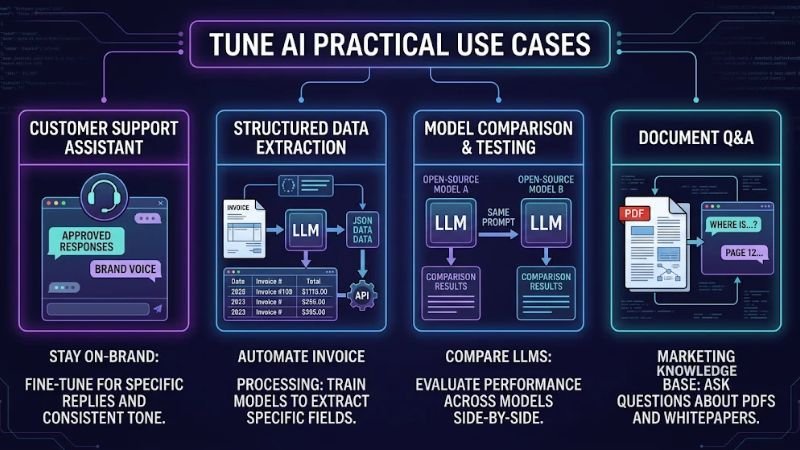
A few realistic scenarios show where the approach made sense:
- A support assistant with a fixed voice. An e-commerce company fine-tunes a smaller model on approved replies so responses stay on-brand and match return-policy wording.
- Structured data extraction. An operations team trains a model to pull fields from invoices into a consistent format, then deploys it as an endpoint.
- Model comparison. A product manager tests several open-source models on the same prompts before engineering picks one.
- Document Q&A. A marketing team asks questions about a PDF, such as a competitor’s whitepaper.
- Brand and safety guardrails. A team adds examples of what the model should refuse to say, then evaluates edge cases.
What these examples share is a narrow, repeatable task. Fine-tuning tends to make sense when you need a model to do the same kind of job many times, and it’s usually overkill for one-off questions. These use cases still exist. Only this particular vendor is gone.
Tune AI Benefits and Limitations
Benefits, based on how the platform was designed:
- It lowered the barrier to customizing open-source AI models.
- It supported deployment in your own cloud environment.
- It combined a playground, deployment, and logging in one place.
- It added new open-source models quickly, according to its own announcements.
Limitations:
- It’s no longer available. The biggest one by far. You can’t sign up or depend on it in production.
- Stale listings. Some directories still show it as active, with old ratings and feature blurbs.
- Unreliable secondary claims. Some aggregator profiles repeat performance figures about processing time and accuracy that don’t trace back to an official source, so none are used here.
- Fine-tuning isn’t a shortcut. It still takes good examples and someone on the team who can judge whether the results are actually better.
Tune AI Pricing
It helps to separate what’s known from what isn’t.
Documented historical pricing. Tune Studio’s own documentation said hardware for deployed models and fine-tuning jobs was billed by the hour in US dollars. NVIDIA L4 GPUs were listed at $1.40 per hour, while A100 and H100 hardware was available by contract. The same page listed pricing for public models, but those figures aren’t reproduced here because they may have changed over the product’s life.
Third-party pricing claims. Some directory listings show a subscription price for Tune Studio. None of those could be traced to an official source, so they aren’t cited.
Current availability. The service isn’t operating, so there are no plans to buy. If you had a paid account, check your email and billing records for closure details.
When you compare alternatives, confirm current USD pricing on each vendor’s own site. Hosting and fine-tuning costs usually depend on usage, such as tokens processed or GPU hours, and they change often.
Tune AI Alternatives and How They Compare
Since Tune AI can’t be tested today, the useful comparison is between the approach it represented and the other ways teams handle the same job. Each type suits a different reader.
| Alternative type | Why a team might choose it | Main trade-off |
|---|---|---|
| Hosted AI APIs | Fastest way to add AI to an app, with no training needed | Long prompts add cost, and behavior can be inconsistent |
| Cloud AI platforms with fine-tuning | Tuning and hosting inside a cloud account you may already use | More setup and cloud expertise required |
| Open-model hosting providers | Run and tune open-source models without managing GPUs | You depend on the provider’s model catalog and pricing |
| Self-hosted open-source tools | Maximum control over data and cost structure | You handle training, serving, scaling, and monitoring |
| Multi-model chat interfaces | Switch between several AI models from one place | Less control over customization and deployment |
Here are official starting points for the main types. Amazon Bedrock, Google Cloud’s Gemini tuning, and Microsoft Foundry represent cloud AI platforms with built-in fine-tuning. Together AI covers hosted fine-tuning for open-weight models, and Hugging Face Inference Endpoints is a route for deploying models on managed infrastructure.
Vendor roadmaps shift, so check before you commit. OpenAI’s documentation, for example, now says it is winding down its fine-tuning platform and that it’s no longer accessible to new users. That’s one more reason to read current documentation rather than rely on older roundups.
The trade-off is control versus convenience. A platform like Tune Studio sat in the middle: more control than a plain chatbot, less work than a fully DIY stack. Larger, better-funded competitors now serve that middle ground, and none is the universal best choice. It depends on your data sensitivity, budget, and technical resources.
Is Tune AI Worth Trying?
You can’t try it, but the question behind the question is worth answering: is the type of tool Tune AI offered worth trying?
- Yes, if you’re a developer or product team with a repeatable task, decent example data, and a need for consistent output or private deployment.
- Probably not, if you mostly need occasional writing help or research. A general chat assistant is simpler and cheaper.
- Before committing to any platform, check the vendor’s stability, how you can export models and data, and what happens if the company shuts down. Some providers, such as Together AI, let you download a fine-tuned model as a standalone checkpoint. If your model or training data lives only on one vendor’s platform, a shutdown can hurt.
A note on reviews: this article isn’t based on hands-on testing, and it doesn’t quote user reviews. Pages titled “Tune AI review” on software directories may date from when the product was live, and some don’t reflect the closure.
If You Used Tune AI Before
If you had an account or a model on the platform, a few steps are worth taking:
- Check your email and billing records for closure messages.
- Look for saved model files. Tune Studio’s documentation said that, after a fine-tuning job finished, you could deploy or download the fine-tuned weights. If you kept a copy, check the base model’s license before reusing it.
- Note which base model and settings you used, if you still have that information, so you can reproduce the setup elsewhere.
- Keep a clean copy of your training examples. Fine-tuning services have their own upload requirements, and Together AI’s data guide shows one common format, JSONL files with one example per line.
- Rebuild on a supported platform and compare results against your old outputs before switching over.
Frequently Asked Questions About Tune AI
What is Tune AI?
Tune AI was a generative AI platform, formerly known as NimbleBox, that offered Tune Chat for chatting with AI models and Tune Studio for fine-tuning and deploying open-source language models.
Is Tune AI still available?
No. Crunchbase lists the company as permanently closed, and other databases report that Tune Chat and Tune Studio went offline on February 28, 2025.
What happened to Tune AI?
The company wound down and its products went offline. Its GitHub organization was later archived. The reasons for the closure haven’t been documented in the sources reviewed for this guide.
What did Tune AI do?
It helped teams customize and run AI models by letting developers fine-tune open-source LLMs, deploy them through APIs, and test them in a playground. Tune Chat gave general users a chat interface for AI models.
How did Tune AI work?
You chose a base model, supplied example data, fine-tuned it, deployed it, and reviewed the outputs. Tune Chat worked like a standard AI chat app.
Was Tune AI free?
Tune Studio’s documentation listed hourly hardware pricing, with NVIDIA L4 GPUs at $1.40 per hour, so it wasn’t purely free. The service is now closed, and no plans are available.
Who was Tune AI designed for?
Mainly developers, startups, and enterprises. Marketers and creators could use Tune Chat for content tasks, though similar AI tools are widely available.
What are the alternatives to Tune AI?
It depends on your goal. For fine-tuning and deployment, look at cloud AI platforms and model-hosting providers. For multi-model chat, look at current assistants and routing tools. Compare current pricing on each vendor’s site.
Conclusion
Tune AI is best understood as a case study now. It began as NimbleBox, rebranded in 2024, launched Tune Chat and Tune Studio during the open-source model wave, and closed in early 2025. Its approach of fine-tuning, deployment in your own cloud, and access to open-source models is still relevant for AI software, but you’ll need a different vendor to do it.
If you searched for Tune AI hoping to sign up, start by deciding what you need: customization, deployment, or a chat assistant. Then choose a currently supported platform and make sure you can export your data and models. Always verify features and USD pricing on official vendor websites before committing.