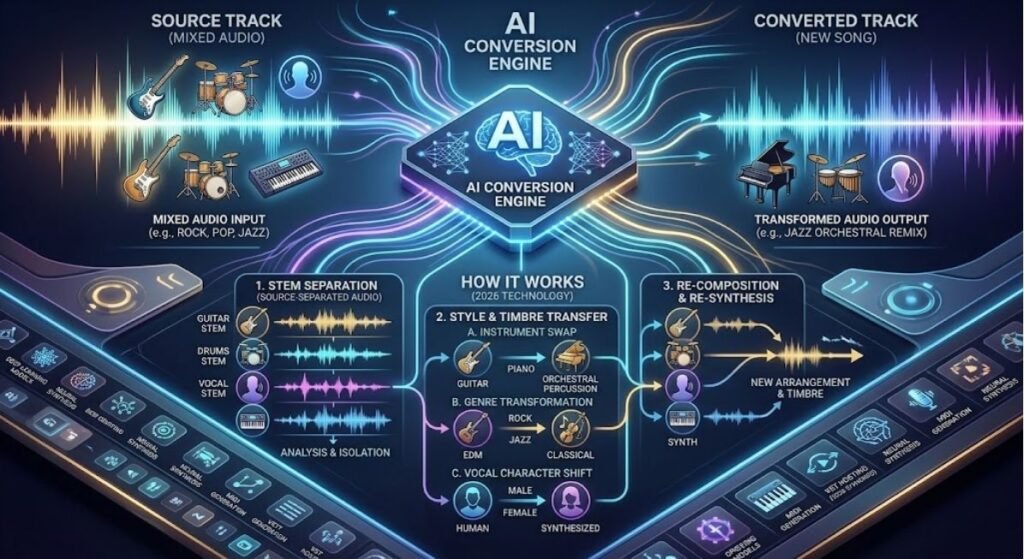
Music production has changed dramatically over the past few years. Not too long ago, if you wanted to change an instrument in a song, you needed a studio, a sound engineer, and expensive equipment. Today, thanks to technology that can AI convert instruments in song, this entire process can be done in minutes, right from your laptop or even your phone.
Whether you’re a music producer, a singer, a YouTuber, or simply someone who loves experimenting with your favorite tracks, this guide is for you. In this article, we’ll break down exactly what instrument conversion means, how artificial intelligence makes it possible, the best tools available today, the pros and cons of using this technology, and answers to some of the most common questions people have.
In today’s digital era, music technology has advanced so much that any creator — professional or beginner — can present their songs in an entirely new way. This is exactly why AI music tools, virtual instruments, and automated sound editing software are becoming increasingly popular across the world.
What Does AI Convert Instruments in Song Actually Mean?
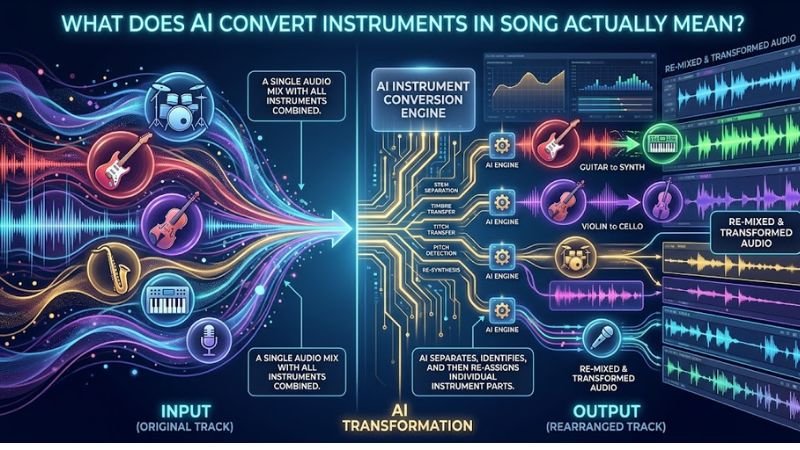
In simple terms, when we talk about using AI to change instruments in a track, we mean using artificial intelligence to change the instrument used in a track — for example, turning a guitar melody into a piano or flute — while keeping the original tune, rhythm, and emotion intact.
This technology relies on deep learning models that analyze audio patterns in detail. It isn’t just a basic filter or effect; it’s an advanced audio analysis system that separately identifies pitch, tone, timbre, and rhythm, then reconstructs that same melody using a completely different instrument’s sound characteristics.
In technical circles, this process is often referred to as “timbre transfer” or “instrument style transfer,” and it’s considered one of the most exciting innovations in AI-powered music technology. For music producers and sound engineers, this has become a genuinely game-changing tool.
How Does This Technology Actually Work?
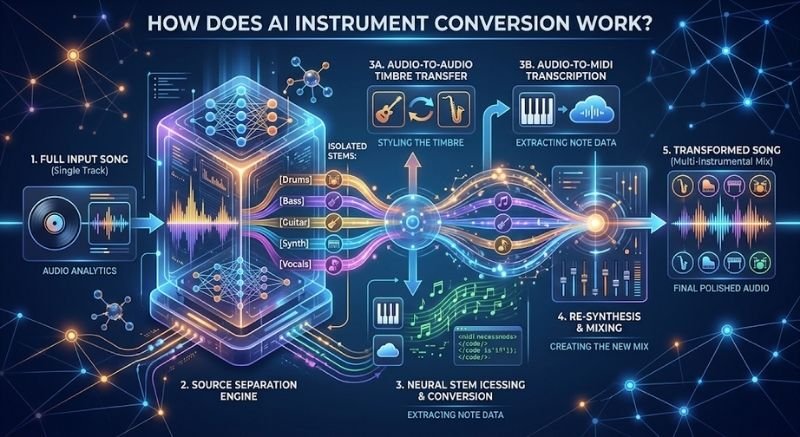
When software is used to convert instruments in a song using AI, several technical steps happen behind the scenes:
- Audio Separation (Stem Separation): First, the AI splits the song into separate layers — vocals, drums, bass, and melody instruments. This is known as stem separation.
- Instrument Recognition: Next, the system identifies which instrument is playing which melody line.
- Audio-to-MIDI Conversion: Many tools convert the instrument’s melody into MIDI data first, capturing note-by-note information.
- Timbre/Tone Replacement: A neural network then uses a new instrument’s sound library or trained voice model to regenerate that same melody using the target instrument’s characteristics.
- Final Mixing: Finally, the newly converted instrument track is remixed back into the rest of the song to produce a natural, cohesive sound.
This is why converting instruments through artificial intelligence isn’t a single-step task — it’s a complete music production pipeline running in real time or near real time. Machine learning algorithms, neural audio synthesis, and digital signal processing (DSP) all work together throughout this process.
Why Is This AI-Powered Instrument Conversion Becoming So Popular?
This technology is gaining massive popularity in the music industry because it allows creators to produce new versions of a track without hiring additional musicians or booking expensive studio time. Some of the biggest reasons include:
- Time Saving: Manual re-recording takes hours; AI can complete the same task in minutes.
- Cost Effective: No need to hire studio musicians or rent expensive equipment.
- Creative Freedom: Multiple versions of the same song — acoustic, orchestral, lo-fi — can be created easily.
- Remix Culture: Content creators and DJs are using this technology to build fresh remixes and mashups.
- Accessibility: Even beginners with no formal music theory background can produce professional-quality output.
- Social Media Content: Customizing background music for Reels, Shorts, and podcasts has become much simpler.
This is exactly why AI music generators, stem separation software, and automated remixing tools are seeing such rapid growth in demand. This trend isn’t limited to professionals — college students, hobbyist musicians, and everyday content creators are actively using it too.
Best AI Tools That Can Convert Instruments in a Song
There are several AI-based platforms available today that specialize in converting instruments within a song. Below are some popular categories that are currently trending among creators:
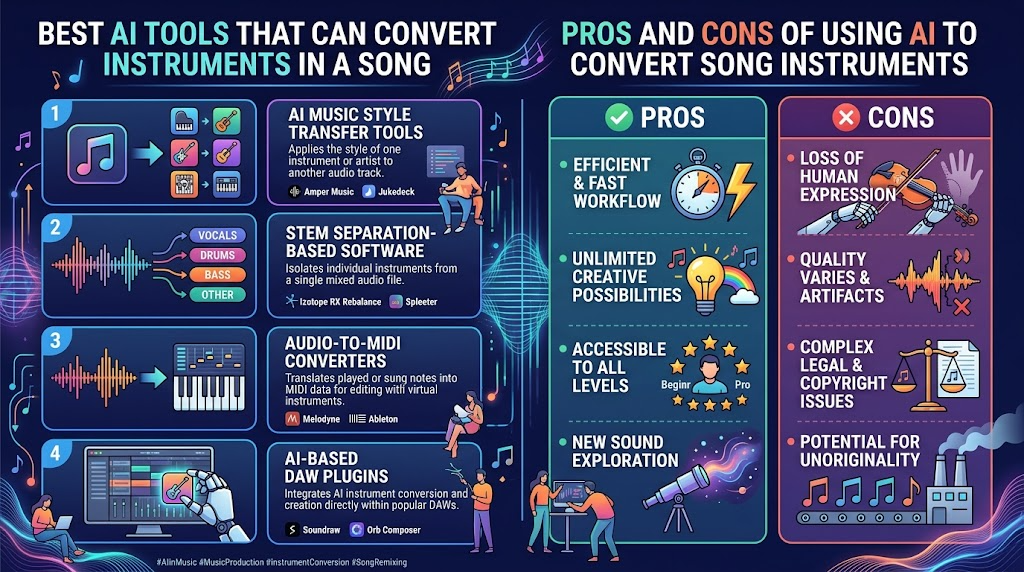
1. AI Music Style Transfer Tools
These tools use deep learning models to convert a melody from one instrument into another — for instance, guitar to piano, or violin to flute — while preserving the musical style and emotional tone of the original.
2. Stem Separation-Based Software
These tools first split the song into individual tracks, then let you modify each track independently. This means you can work on a single instrument without affecting the rest of the mix.
3. Audio-to-MIDI Converters
These tools convert any audio melody into MIDI format, allowing you to replay it through any virtual instrument. This is especially useful for producers who want to build their own custom arrangements.
4. AI-Based DAW Plugins
Many modern Digital Audio Workstations (DAWs) now come with built-in AI plugins that allow real-time instrument conversion, helping producers speed up their workflow without needing separate software.
Each of these tools comes with different features, so it’s important to choose the right one based on your specific needs. Always try the free trial before committing to any paid plan.
Step-by-Step Guide: How to Convert Instruments in a Song Using AI
If you want to try this process yourself, here’s a simple step-by-step guide:
- Choose the Right Tool: Select a reliable AI music tool based on your specific requirements.
- Upload the Original Song: Upload a high-quality audio file of the song where you want to change an instrument.
- Select the Instrument Track: Choose the specific instrument within the software that you want to convert.
- Choose the Target Instrument: Decide which new instrument you want the original one converted into.
- Let the AI Process the Audio: The system will analyze the audio and generate a new version — this can take anywhere from a few seconds to a few minutes.
- Preview and Adjust: Listen to the output and adjust volume, pitch, or timing if needed.
- Export the Final File: Once you’re satisfied with the result, export the final file and use it in your project.
By following these steps, even a complete beginner can easily convert instruments in a song without needing any advanced technical knowledge.
Pros and Cons of Using AI to Convert Song Instruments
Like any technology, this feature comes with both positive and negative aspects. Let’s break them down in detail.
Pros
- Fast and Efficient: Processing takes far less time compared to manual re-recording.
- Low-Cost Solution: Eliminates the need for studio bookings and hired musicians.
- Creative Experimentation: Multiple musical versions of the same track can be created easily.
- Beginner Friendly: Can be used without any technical music knowledge.
- High-Quality Output: Modern AI models produce impressively realistic and natural-sounding results.
- Great for Remixes and Covers: A powerful tool for content creators looking to reimagine existing tracks.
- Scalability: Multiple songs or tracks can be processed at once.
Cons
- Lower Accuracy on Complex Songs: When too many instruments overlap, the AI can sometimes get confused.
- Loss of Original Feel: In some cases, the converted instrument may not carry the same emotional depth as the original.
- Requires Internet and Processing Power: Many advanced tools run online or need a fairly powerful system.
- Copyright Concerns: Modifying and publishing someone else’s original song can create legal issues.
- Learning Curve: Getting the best results often requires some time to understand the tool’s settings.
- Subscription Costs: Many premium tools come with monthly or yearly fees that can add up.
Overall, the benefits clearly outweigh the drawbacks, especially for those who are new to music creation or working with limited resources.
Comparison Table: Different Approaches to Instrument Conversion
The table below compares different methods so you can choose the right option for your needs.
| Feature | Traditional Re-Recording | Basic Audio Editing Software | AI Convert Instruments in Song Tools |
| Time Required | Very high (hours/days) | Medium | Low (minutes) |
| Cost | High (studio + musicians) | Medium (software license) | Low to Medium |
| Skill Level Required | Professional musician | Intermediate | Beginner friendly |
| Sound Quality | Authentic but fixed | Depends on manual editing | Realistic and customizable |
| Flexibility | Low | Medium | High |
| Creating Multiple Versions | Difficult | Time-consuming | Easy and fast |
| Best For | Professional studio work | Basic editing needs | Quick experimentation and remixing |
This comparison clearly shows that when it comes to speed, flexibility, and cost-effectiveness, the AI-based approach is far ahead of other methods. For beginners, it has become the most practical option available.
Things to Keep in Mind While Using This Technology
- Always use a high-quality original audio file, since this directly improves output accuracy.
- Get proper permission before publishing modified versions of copyrighted songs on public platforms.
- Experiment with different instrument combinations to get the best creative result.
- Test the final output on both headphones and speakers.
- For professional projects, manually fine-tune the output afterward.
- Keep your software updated, since AI models are regularly improved and retrained.
- Avoid background noise in your source audio, as it directly affects conversion quality.
Following these small tips can help you get much better, more professional results from the instrument conversion process.
Industries Where This Technology Is Being Used
It’s not just music producers benefiting from this technology — several other professionals are taking advantage of it too:
- Film and Video Editors: Customizing background scores to match a project’s mood.
- Content Creators: Creating unique background music for YouTube, Instagram Reels, and podcasts.
- Music Teachers: Helping students understand different instrument arrangements.
- Game Developers: Creating dynamic and adaptive background music for video games.
- Independent Artists: Releasing multiple versions of their songs without a large budget.
This shows that the technology isn’t limited to the music industry alone — it’s also making its way into entertainment and education.
AI Instrument Conversion vs Human Musicians: Which Is Better?
This is a question that crosses the mind of nearly every music creator at some point. Both approaches have their own strengths, so it’s more useful to think of them as complementary rather than competing.
A professional human musician brings feeling, emotion, and years of practice that’s still difficult for any AI system to fully replicate. Live performance, improvisation, and subtle emotional nuance remain a human strength.
On the other hand, AI-based systems are far ahead in speed, consistency, and cost-effectiveness. Testing multiple versions in a single day, exploring different genres, or producing professional-quality output on a tight budget — all of this has become possible because of AI.
The best approach is often a smart combination of both: use AI to quickly generate a draft or idea, then bring in a human musician for the final polish when needed. This saves time while still maintaining quality.
Common Mistakes People Make While Converting Instruments
Many beginners make a few common mistakes the first time they try this technology, which ends up affecting the quality of their output:
- Using Low-Quality Source Files: If the original audio is poor quality, the output will never sound great.
- Converting Too Many Instruments at Once: Focusing on just one or two instruments at a time gives better results.
- Ignoring the Settings: Default settings don’t always give the best results — some customization is usually necessary.
- Not Testing the Output: Always listen to the final file on different devices before publishing.
- Ignoring Copyright Rules: This is one of the most common and riskiest mistakes, and it can lead to legal trouble.
Avoiding these mistakes can help any creator achieve better, more professional-level results.
How to Choose the Right Tool for Your Project
With so many options available, picking the right software can feel overwhelming. Here are a few practical factors to consider before making a decision:
- Purpose of Use: A hobbyist experimenting for fun has very different needs than a professional producer working on a commercial release.
- Budget: Some tools offer generous free tiers, while others are subscription-based with advanced features locked behind a paywall.
- Output Quality: Always test a tool with a short sample before committing to a full project, so you can judge the realism of the converted instrument.
- Ease of Use: If you’re a beginner, look for tools with simple drag-and-drop interfaces rather than complex, technical dashboards.
- Community and Support: Active user communities and responsive customer support can save you a lot of frustration when troubleshooting issues.
Taking a few extra minutes to evaluate these factors can save significant time and money down the line, especially if you plan to use this technology regularly for your music projects.
The Future of AI Music Tools and Instrument Conversion
This technology is expected to become even more advanced in the coming years. Experts believe real-time AI music tools will eventually be used in live performances, allowing singers to change their instrument sounds instantly while performing on stage. Combined with AI music generators and virtual instruments, this could reshape music production entirely.
As machine learning models continue to improve, this technology will become more natural, faster, and more accessible — for beginners and professional studios alike. In the coming years, we can expect this feature to be built directly into mobile apps, allowing anyone to perform high-quality instrument conversion right from their phone.
Frequently Asked Questions (FAQs)
Q1. What does it mean to AI convert instruments in song? It means using artificial intelligence to change the instrument used in a song’s melody — for example, replacing a guitar with a piano — while keeping the original melody and rhythm intact.
Q2. Is it possible to convert instruments using AI for free? Yes, many tools offer free versions, though advanced features are usually available only through paid plans.
Q3. Does AI-converted music sound as good as the original? Modern AI models produce fairly realistic results, though complex arrangements may occasionally show slight differences from the original.
Q4. Can beginners use this technology too? Absolutely. Most AI music tools come with user-friendly interfaces that are easy for beginners to understand and use.
Q5. Is it legal to use this technology on copyrighted songs? It’s fine for personal use, but you need permission from the original creator before publishing modified versions on public platforms.
Q6. What’s the best audio format for AI instrument conversion? High-quality WAV or other lossless formats work best, since compressed formats lose important audio detail.
Q7. Can this be done using just a mobile phone? Yes, many mobile apps and web-based tools now allow you to convert instruments in a song directly from your phone.
Conclusion
The ability to convert instruments in a song using AI isn’t just a passing trend — it’s a glimpse into the future of music production. This technology is opening up new possibilities for creators, musicians, and hobbyists alike, making professional-level results achievable without a huge budget or technical expertise.
Whether you want to create a fresh remix, present your cover song in a new way, or simply experiment for fun, this technology can be a powerful and creative solution. Just remember to choose the right tool, follow copyright guidelines, and experiment a little to get the best possible result.
As AI music tools continue to improve, music creation will only become easier, faster, and more accessible to everyone. If you haven’t tried this technology yet, it’s worth exploring — your next song’s best version might just come from it.
