
The AI voice generation space has exploded over the past two years, and it feels like a new text-to-speech tool launches every month promising “human-like” narration. Most of them, though, hide their best features behind a paywall the moment you try to do anything useful. That’s exactly why this platform has been getting so much attention lately — it’s marketed as a completely free AI voice generator with one of the largest character voice libraries online. But does it actually hold up, or is this just another overhyped tool riding the AI wave?
I spent time digging into how it works, what it offers, where it falls short, and how it stacks up against established names like ElevenLabs and Speechify. This review breaks all of that down so you can decide whether it deserves a place in your content creation toolkit.
What Is Cvoiceai?
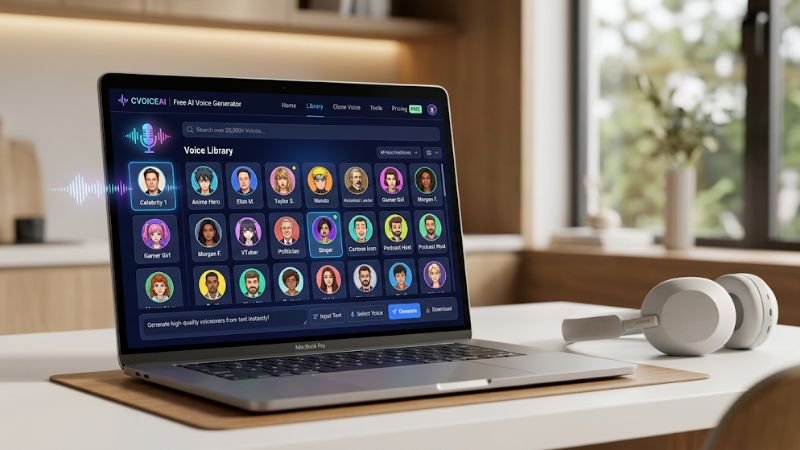
Cvoiceai is an AI-powered voice generation platform that converts written text into natural-sounding, human-like speech. Instead of hiring a voice actor, booking studio time, or investing in expensive recording equipment, you simply type your script into the app, choose a voice from its library, and download finished audio within seconds.
What makes this tool different from a generic text-to-speech engine is the sheer scale of its voice catalog. The platform reportedly hosts over 20,000 voices, spanning celebrities, singers, actors, anime characters, YouTubers, streamers, and even historical figures. That’s a staggering number compared to most AI voiceover tools, which usually top out at a few hundred stock voices.
It launched in 2024 with a fairly bold premise for this market: voice synthesis technology shouldn’t be locked behind monthly subscriptions. The service positions itself as fully free — including API access — at a time when most competitors reserve their best voice models, fastest generation speeds, and commercial licensing for paying customers.
Whether you’re a YouTuber, podcaster, indie game developer, online educator, or someone experimenting with AI narration for the first time, the platform aims to make voice cloning and speech synthesis accessible without a budget requirement getting in the way.
How Does It Work?
One thing I appreciated while testing this tool is how little friction there is between opening the site and getting usable audio. You don’t need coding knowledge, a powerful GPU, or any prior experience with voice AI tools. Here’s the general workflow:
- Open the app in your browser — there’s nothing to install, and it runs entirely as a web app.
- Browse the voice library — voices can be filtered by character type, occupation, nationality, or era, which makes locating a specific style much faster than scrolling endlessly.
- Select your voice — options range from pop singers and film actors to anime characters, politicians, and internet personalities.
- Enter your script — type or paste the text you want converted into speech.
- Generate and download — the engine processes the request and produces ready-to-use audio in a matter of seconds.
Behind the scenes, it runs on neural network models trained to replicate the tone, pitch, rhythm, and cadence of the original voice sources — the same underlying category of technology used in professional voice cloning and voice conversion systems. The difference is that all of that technical complexity is wrapped into a clean, simple interface so anyone can use it without understanding how the models actually work.
Key Features of Cvoiceai
Before deciding whether this tool is right for your workflow, it’s worth understanding what actually sets it apart from other AI voiceover generators on the market.
- 20,000+ Character Voices — This is the platform’s biggest differentiator. Few free or even paid tools come close to matching this voice library size.
- Multi-Language Support — Several languages are supported, which is a real advantage for creators producing content for international or non-English-speaking audiences.
- Free API Access — Developers can integrate the speech engine directly into their own apps or products without licensing fees, which is rare in a market where API access is usually the first thing locked behind a paywall.
- No Usage Limits — Many free-tier text-to-speech tools cap you at a few minutes of audio per month. This service claims unlimited generation, which removes a major pain point for high-volume creators.
- Searchable Voice Directory — Voices are organized by category, nationality, occupation, and decade, making it easy to find a specific tone or character type quickly.
- No Credit Card Required — You can start generating audio immediately without entering payment information, which lowers the barrier to entry considerably.
Why AI Voice Generators Are Booming Right Now
It’s worth stepping back for a second to understand why tools like this one are gaining so much traction in 2026. Short-form video content — TikToks, YouTube Shorts, Instagram Reels — depends heavily on fast turnaround. Creators don’t have time to book a voice actor for a 30-second clip, and traditional TTS voices often sound too robotic to hold attention.
At the same time, speech synthesis technology has matured to a point where AI-generated voices sound noticeably more natural than they did even two or three years ago. Combine that improvement with the rise of character-driven content — where a familiar or fun voice adds personality to a video — and you get exactly the niche this platform is targeting. It’s not trying to replace high-end studio narration; it’s trying to make voiceover production fast, free, and entertaining for everyday content creators.
Pros and Cons
Like any tool, this one comes with clear strengths as well as a few trade-offs worth understanding before relying on it for serious or commercial projects.

Pros
- Completely free to use, including API access, with no hidden charges
- One of the largest character voice libraries currently available online
- Beginner-friendly interface that requires no technical skill
- Multi-language support suited to global content creation
- No usage caps, which is uncommon among free AI voice generators
- Fast generation speed, useful for tight content deadlines
- Fully browser-based with nothing to download or install
Cons
- No clearly stated long-term monetization model, which raises questions about how sustainable Cvoiceai’s free model really is
- Celebrity and character voices carry potential copyright and likeness risks if used commercially
- Emotional nuance and vocal depth may not match premium tools built specifically for professional narration or audiobook production
- No visible enterprise support tier or service-level guarantees
- Character-based voices may not suit brands looking to establish a unique, original voice identity
Cvoiceai vs Other AI Voice Generators
Here’s how it stacks up against some of the more established names in the AI voice and text-to-speech space.

| Feature | Cvoiceai | ElevenLabs | Speechify | Voicemod |
|---|---|---|---|---|
| Price | 100% Free | Free tier + Paid plans | Free tier + Paid plans | Free tier + Paid plans |
| Voice Library Size | 20,000+ character voices | Limited premium voices | Standard TTS voices | Real-time voice filters |
| API Access | Free, unlimited | Paid, usage-based | Limited | Not a primary focus |
| Best For | Character-based voiceovers | Professional, emotional narration | Reading & accessibility | Live voice changing |
| Multi-language Support | Yes | Yes | Yes | Limited |
| Usage Limits | None reported | Character/minute caps | Word limits on free tier | Session-based |
| Commercial Use | Plan-dependent | Yes, with license | Yes | Limited |
The comparison makes the trade-off pretty clear: this platform wins decisively on cost and sheer voice variety, but a tool like ElevenLabs still edges ahead when it comes to emotional realism and studio-grade narration quality. If your project depends on subtle emotional delivery — think audiobooks or documentary-style narration — it’s worth testing both before committing.
Who Should Use This Tool?
This isn’t built for every use case, but it’s a genuinely strong fit for several types of creators:
- Content creators making TikToks or YouTube Shorts who need fast, entertaining voiceovers without production delays
- Podcasters experimenting with character intros, comedic skits, or recurring bits
- Game developers who need placeholder dialogue during development, or even final in-game voice lines for indie projects with limited budgets
- Educators producing audio lessons or explainer content without access to a recording studio
- Developers who want a free text-to-speech API to build into their own apps, bots, or accessibility tools
If your goal is polished, emotionally rich narration for something like a professional audiobook or a corporate training video, it’s worth comparing this option against premium alternatives first — free doesn’t always mean best-suited to every project.
Is It Really Free?
This is usually the first question people ask, and based on what the platform states publicly, the answer is yes. It markets itself as completely free, including full API access, unlimited generation, and no requirement to enter a credit card at signup.
That said, the team behind it has also mentioned exploring other ways to sustain the business long-term, which could eventually mean monetization through advertising or optional add-ons — without necessarily removing free access to the core voice generation tool. It’s a reasonable approach, and one that mirrors how several other “free forever” tech products have evolved once their user base grows large enough to support alternative revenue streams.
Is It Safe to Use?
As with any platform built around celebrity or character likenesses, a bit of caution is warranted. Before using generated audio commercially, it’s worth reviewing the terms of service directly, since cloning the voices of real public figures can raise legal and ethical questions depending on your country and how the audio will be used.
For personal projects, educational content, or non-commercial creative work, this tool is generally considered low-risk to experiment with. The bigger concern arises specifically around monetized content that uses a recognizable celebrity voice without clear rights or permissions — that’s the area where creators should proceed carefully.
Tips for Getting the Best Results
A few practical notes if you decide to try Cvoiceai out: keep scripts punctuated clearly, since pacing and pauses in AI-generated speech often follow your punctuation closely. Shorter sentences tend to sound more natural than long, run-on paragraphs. It’s also worth testing two or three different voices for the same script before settling on one, since tone and delivery can vary noticeably between character voices even within the same general category.
Frequently Asked Questions
1. What is Cvoiceai used for?
It’s used to generate AI voiceovers from text for videos, podcasts, presentations, audiobooks, and educational content, removing the need for professional voice actors or recording setups.
2. Do I need any special equipment to use it?
No. Everything runs through AI voice synthesis in the browser, so there’s no need for a microphone, recording studio, or specialized hardware.
3. Can I choose different voice styles?
Yes, the platform offers a wide range of voices with different accents, genders, tones, and speaking styles, searchable by category.
4. Is Cvoiceai good for YouTube creators?
Yes. Many YouTubers and Shorts creators use it to speed up narration production without sacrificing audio quality or paying for voice talent.
5. Does it support languages other than English?
Yes, multi-language support helps creators reach international and non-English-speaking audiences.
6. Can businesses legally use the generated audio?
Commercial usage rights can vary depending on the voice selected and the platform’s current terms, especially with celebrity or character-based voices. It’s best to check the policy directly before using generated content in paid or branded work.
7. How is it different from other text-to-speech tools?
Unlike generic TTS tools with flat, robotic-sounding voices, it focuses on character-based voices modeled after real celebrities and pop culture figures, combined with a completely free and unlimited usage model.
8. Is there a mobile app for Cvoiceai?
As of now, it’s primarily a browser-based platform, so there’s no dedicated mobile app — but the web version works on mobile browsers without any issues.
Conclusion
Cvoiceai has carved out a distinct space in a crowded AI voice generator market by pairing a massive, free voice library with a genuinely simple user experience. For creators who need fast, character-driven voiceovers without spending a single rupee or dollar, it’s one of the more generous tools currently available — and the lack of usage caps makes it especially appealing for high-volume content production.
That said, it’s not necessarily a full replacement for premium, professional-grade voice platforms when emotional depth, studio-level polish, or enterprise reliability are the priority. Tools like ElevenLabs still hold an edge for narration that needs to carry real emotional weight.
If affordability, voice variety, and speed matter most to you — especially for YouTube videos, TikToks, game dialogue, or personal creative projects — Cvoiceai is well worth trying. Just stay mindful of copyright and usage rights when working with recognizable celebrity or character voices, particularly for monetized content. As AI voice technology keeps advancing, tools like this are proof that high-quality voice generation is steadily becoming accessible to everyone, not just those with big production budgets.
