
You open a blank document, the cursor blinks, and the deadline does not move. Ten minutes later you have typed one sentence and deleted it. This is exactly the moment an AI writing tool is built for: it turns a vague idea into a rough draft, a clean outline or a sharper paragraph in seconds.
But there is a catch most guides skip. Anyone can now produce a thousand words in a minute, so the web is filling up with flat, interchangeable articles. Readers notice, and Google keeps tightening its spam systems: one SEO analyst counts four Google spam updates in 2026 alone. The real question is no longer whether to use an AI writing tool. It is how to use one so your work still sounds like a person who knows the subject.
This guide answers that in plain language. You will see what these tools actually do, which ones fit which job in October 2026, what they roughly cost, where they fail, and a simple workflow for adding the experience and fact-checking that rankings depend on. It is written for bloggers, students, freelancers, marketers and small business owners, including readers in Pakistan, India and other markets where a $20 monthly subscription is a real decision, not pocket change.
What Is an AI Writing Tool and Why Is Everyone Using One?
An AI writing tool is software that uses a large language model to draft, rewrite, summarize or polish text based on the instructions you give it. A decade ago, “writing software” meant a spell checker. Today it can outline a blog post, turn a rambling email into a polite one, or rewrite a product page for a different audience in under a minute.
The shift is real, but so is the noise. Search for the best AI writing tool and you will land on dozens of lists that repeat the same names and quote prices that changed months ago. This guide takes a more practical route. It explains how these tools work, which ones deserve your attention in October 2026, what they roughly cost, where they fall short, and how to use them without ending up with the flat, generic copy that readers spot instantly.
It is written for bloggers, students, freelancers, marketers and small business owners, including people in Pakistan, India and other markets where a $20 monthly subscription is a real decision, not pocket change. If you write regularly, the right AI writing tool can give you back several hours every week. The wrong one just creates extra editing.
One question comes up before anything else: will Google punish you for using AI? Based on Google’s published guidance, not for using AI itself. Google says it aims to reward high-quality content however it is produced, while using automation mainly to manipulate rankings breaks its spam policies. In practice, the tool is rarely the problem. The workflow around it is, and that idea runs through every section below.
How an AI Writing Tool Actually Works

Under the hood, most tools sit on a large language model, a system trained on huge amounts of text to predict which words are likely to come next. When you type a prompt, the model builds a response piece by piece, guided by your instructions, any documents you attach and the settings the product adds in the background. Some products, like ChatGPT, Claude and Gemini, are the model makers’ own apps. Others, like Jasper or Writesonic, wrap a model with templates, brand settings and publishing features.
Here is why that matters. A model does not “know” facts the way a researcher does. It generates plausible text. That is why a polished paragraph can still contain a wrong date, an invented statistic or a quote nobody said. Google’s recent guidance for publishers urges manual fact-checking of AI output before it goes live, and that includes titles, meta descriptions and alt text, not only the body. Every AI writing tool has this weakness, so a human check is not optional.
Three Types of AI Writing Tools
Most products fall into one of three groups, and mixing them up is the most common buying mistake.
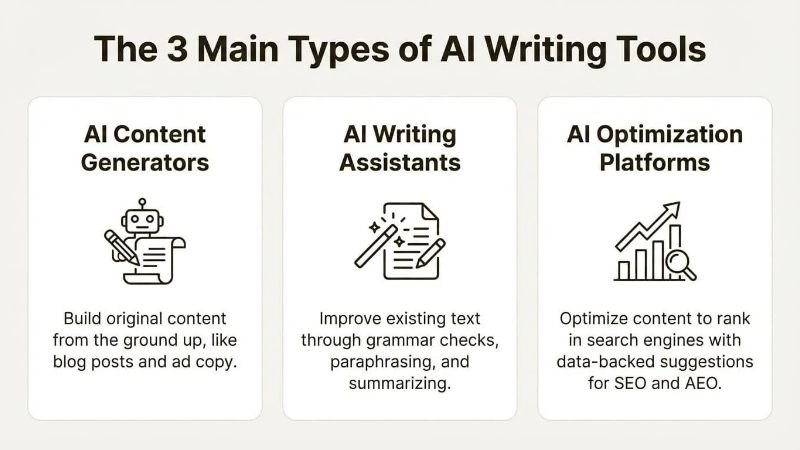
- General assistants (ChatGPT, Claude, Gemini): flexible chat apps that write, research, analyze and code.
- Marketing and SEO platforms (Jasper, Writesonic, Copy.ai, Frase): templates, brand voice, team workflows and, increasingly, tracking of how your brand shows up in AI answers.
- Editors and rewriters (Grammarly, QuillBot, Wordtune): they improve text you have already written instead of creating it from scratch.
Many writers end up using one from each group: an assistant for drafts, an editor for polish, and a marketing platform only when a team needs consistency. Choosing an AI writing tool starts with knowing which job you actually need done.
Features That Matter in an AI Writing Tool
Vendor pages list dozens of features. Only a handful change your results.
Output quality and voice
Read two or three samples on your own topic before paying. Look for varied sentence length, specific detail and a tone that fits your audience. Several 2026 comparisons rate Claude highest for natural long-form prose and ChatGPT as the most versatile all-rounder, though opinions differ and results depend heavily on your prompt.
Context length
A longer context window lets a tool keep a whole report or brand guide in mind. Claude and Gemini are often cited for very large windows, around one million tokens on some models, which helps when an edit must respect a 40-page document.
Brand voice and style guides
For teams, this stops ten writers from sounding like ten different companies. Jasper built its reputation here, although reviewers note its Style Guides feature sits on the Business tier.
Research and citations
Tools with live web access or citations, such as Perplexity, Gemini and ChatGPT with search, make verification faster. They still need a human to open the sources.
SEO and AI-search features
Writesonic and Frase add keyword research, content scoring and, in Writesonic’s case, tracking of brand mentions across AI platforms. Treat scores as guidance, not rules.
Integrations, privacy and language
An AI writing tool that lives inside Google Docs, Word, Notion or your CMS gets used far more than one that needs copy and paste. Check whether your content may be used for model training, especially for client or unpublished work, because business plans usually offer stronger controls. If you write in Urdu or Hindi, test each product with your own sample. Most major assistants handle both to some degree, but quality varies.
The Best AI Writing Tools in 2026, Matched to the Job
There is no single best AI writing tool for everyone, so this list is organized by what you are trying to do. Prices are approximate US dollar figures from vendor pages and trackers checked in 2026. They change often and differ by region and billing cycle, so confirm on the official site before you pay.
ChatGPT: the all-rounder
ChatGPT remains the most versatile option, covering drafts, research, images and an enormous add-on ecosystem. Plans run from a low-cost Go tier (about $8) to Plus at $20 and Pro at $200. Its default style can drift toward padded, list-heavy prose, so give it clear voice instructions.
Claude: long-form and natural prose
Claude is frequently rated highest for nuanced long-form writing and for working through long documents. It has a free tier, Pro at $20 and higher Max tiers, with team plans from about $30 per user. It does not generate images, and its third-party integrations are narrower than ChatGPT’s.
Gemini: best inside Google Workspace
If you live in Gmail, Docs and Search, Gemini fits naturally. Google’s consumer plan sits near $20 a month, and results can feel more functional than polished, so plan a light edit for tone.
Jasper: brand voice for teams
Jasper focuses on on-brand marketing content across blogs, ads and email. Expect roughly $39 to $69 per seat monthly depending on plan and billing, with custom Business pricing. It is strong for teams and probably overkill for a solo blogger.
Writesonic: SEO and AI visibility
Writesonic now positions itself around search growth and tracking brand visibility in AI answers. Older reviews that quote a $39 starter plan are out of date, with entry pricing now reported nearer $79.
Grammarly, QuillBot and Wordtune: editing and polish
These improve what you have written. Grammarly has a free plan and Pro near $12 a month on annual billing. QuillBot is a favorite for paraphrasing and academic work, roughly $8 to $13 a month. Wordtune is cheaper still on annual plans.
Rytr: the budget pick
Rytr suits bloggers and small businesses that want capable drafts without enterprise pricing, with a free plan and paid tiers around $9 and $29.
Whichever AI writing tool you try first, run it on one real task for a week. A free trial on your own topic tells you more than any ranking.
AI Writing Tool Comparison Table
This AI writing tool comparison puts the main options side by side. Prices are approximate monthly figures as of October 2026.
| Tool | Best for | Starting price (approx.) | Free plan | Main drawback |
|---|---|---|---|---|
| ChatGPT | All-purpose writing and research | $8 (Go), $20 (Plus) | Yes | Generic style without guidance |
| Claude | Long-form, natural prose | $20 (Pro) | Yes | No image generation, fewer integrations |
| Gemini | Google Workspace users | About $20 | Yes | Can read flat, needs tone editing |
| Jasper | Marketing teams, brand voice | $39 to $69 per seat | No | Costly for solo writers |
| Writesonic | SEO and AI-search visibility | About $79 | Trial only | Pricing and focus have shifted |
| Grammarly | Grammar, clarity, polish | $0 free, about $12 Pro | Yes | Edits more than it creates |
| QuillBot | Paraphrasing, academic writing | About $8 to $13 | Yes | Limited long-form drafting |
| Rytr | Budget drafts | $9 to $29 | Yes | Output quality below premium tools |
Pros and Cons of Using an AI Writing Tool
An AI writing tool is a very good assistant and a poor author. Keeping that split in mind makes the trade-offs easy to see.
Pros
- Speed: outlines, first drafts and rewrites arrive in minutes instead of hours.
- No blank page: a rough draft gives you something to improve, which is often the hardest part.
- Repurposing: one article can become an email, a LinkedIn post and a short script quickly.
- Language support: non-native English writers get cleaner grammar and phrasing.
- Low entry cost: many strong options start free, and the paid tier of the major assistants is around $20 a month.
Cons
- Accuracy risk: models can state wrong facts, dates or figures with total confidence.
- Generic voice: unedited output tends to sound alike across users and topics.
- Policy risk: publishing many thin pages at scale can trigger Google’s scaled content abuse policy, whoever or whatever wrote them.
- Privacy concerns: pasting client or unpublished material into the wrong plan can be a problem.
- Over-reliance: if the tool does all the thinking, your own writing and judgment weaken.
- Stacking costs: a writing assistant, an editor and an SEO platform add up quickly.
How to Choose the Right AI Writing Tool and Make It Sound Human
Picking a product takes five steps, and none of them involve reading another ranking.
- Define the job. Drafting, editing, SEO research and team brand voice are different problems.
- Test with your own prompt. Use a real topic and compare two or three outputs side by side.
- Price your real usage. Count seats, monthly volume and the add-ons you would need.
- Check privacy settings. Find out how your content is stored and whether it trains models.
- Run a one-week trial. Track how much editing each draft needs, not how impressive it looks.
Making AI Writing Sound Human
A good AI writing tool gives you a draft, not a finished article. The difference between a draft that ranks and one that gets ignored usually comes from what you add afterward.
- Feed it your own material. Notes, interview quotes, screenshots and real numbers make the draft specific.
- Name the reader. Telling the tool who you are writing for changes vocabulary and depth.
- Add first-hand experience. A short story, a mistake you made or a result you measured cannot be generated.
- Cut filler openings. Phrases like “in today’s fast-paced world” signal machine writing instantly.
- Vary the rhythm. Mix short sentences with longer ones, then read the piece aloud.
- Check every fact. Open the source behind each statistic, price and date.
When you use any AI writing tool this way, the output stops sounding like everyone else’s, and readers stay longer.
SEO and GEO: Ranking Content Made with an AI Writing Tool

Google’s position has been steady since 2023: AI use is not a ranking penalty, and it is not a ranking boost either. Its guidance says AI content is judged like any other content, while automation used mainly to manipulate rankings violates its spam policies. Two 2026 changes are worth knowing. On May 15, 2026, Google updated its spam policy language so that attempts to manipulate generative AI responses, including AI Overviews and AI Mode, now fall under spam. And reports in October 2026 say Google’s generative AI guidance now tells publishers to fact-check AI output, including metadata, before publishing. SEO analyst Lily Ray counts four Google spam updates this year, in March, June, August and September, so thin mass-produced pages carry real risk.
Here is a practical way to publish with an AI writing tool without putting a site at risk.
- Start from search intent. Ask what the searcher wants to finish doing, then build the page around that, not around a keyword count. Natural use of your main phrase and related terms such as AI writing assistant, content generator and AI copywriting is enough.
- Add proof of experience. Original screenshots, test results, quotes and your own opinion are what make a page non-commodity.
- Write for AI answers too (GEO). Use question-style headings, give a direct answer in the first one or two sentences, add a comparison table and an FAQ, and keep facts current with a visible update date. This helps both Google and AI assistants understand and cite your page. Do not try to game AI answers with hidden instructions or fake authority, because that now counts as spam.
- Write a click-worthy title. Keep it near 60 characters, include the keyword and the year, and promise something specific, such as prices or a comparison.
- Publish fewer, better pages. One well-edited article beats ten unreviewed ones, because every AI writing tool can produce volume but only a person can add judgment.
- Mark up and link. Use FAQ schema where it fits, link to related guides on your own site, and cite the sources behind your numbers.
FAQs About AI Writing Tools
What is the best AI writing tool in 2026?
There is no universal winner. ChatGPT is the most versatile, Claude is often preferred for natural long-form writing, Gemini suits Google Workspace users, and Grammarly is best for editing. Match the tool to your task.
Is there a free AI writing tool?
Yes. ChatGPT, Claude, Gemini, Grammarly, QuillBot and Rytr all offer free plans with limits. They are enough to test your workflow before paying.
Does Google penalize content from an AI writing tool?
No, not for using AI alone. Google evaluates helpfulness and originality, and its spam policies target mass-produced pages made to manipulate rankings, however they were created.
Can an AI writing tool replace a human writer?
Not for work that needs experience, original reporting or accountable facts. It speeds up drafting and editing, but a person still decides what is true and worth saying.
Which AI writing tool is best for SEO content?
Writesonic and Frase offer built-in SEO features, while a general assistant plus a good outline and manual keyword research works well on a budget.
Is it safe to paste confidential work into an AI writing tool?
Only after checking the plan’s data policy. Business and enterprise tiers normally offer stronger privacy controls than free plans.
Can AI write in Urdu or Hindi?
Most major assistants can, with uneven quality. Test with your own sample and have a native speaker review anything you publish.
Conclusion: Use the Tool, Keep the Judgment
The best AI writing tool is the one that fits your job, your budget and your standard for accuracy. For most people that means a general assistant for drafts, an editor for polish and, only if a team needs it, a marketing platform on top. Start free, test on a real task and compare how much editing each result needs before you commit.
Whatever you choose, the ranking advantage does not come from the software. It comes from original experience, checked facts and content that answers the reader’s question better than the next page. Use an AI writing tool to move faster, then add the parts only you can add. Do that consistently and your content becomes easier for both Google and AI assistants to trust.