If you have ever typed “red bass guitar on a stage” into an AI tool and got back an instrument with six strings, two necks, or tuning pegs growing out of the pickguard, you already know the problem. Bass guitars are surprisingly hard for image models to draw. They have long scale lengths, fewer strings than a regular guitar, and a lot of fine hardware that has to line up properly. Picking the best AI bass guitar image generator is therefore less about hype and more about which tool handles these details with the fewest retries.
This guide is written for musicians, album-cover designers, YouTubers, gear bloggers and anyone who needs a believable bass image without booking a photo shoot. I looked at the tools people actually use in 2026 while hunting for the best AI bass guitar image generator, compared them on the things that matter for instrument art, and put together practical prompts you can copy. If you want to explore more creative AI solutions, check out our guide to AI tools for content refinement At the end you will find a comparison table, pros and cons, a FAQ section and a short conclusion to help you decide quickly.
One honest note before we start: AI tools change fast. Model versions, pricing and free limits are updated often, so always check the official pricing page of a tool before you subscribe. I have kept the advice below focused on how the tools behave, which changes far less than the price tag.
Why Bass Guitars Are Hard for AI Image Generators
To understand why one tool beats another, it helps to know where models fail. Image generators learn from millions of pictures, and regular six-string guitars appear far more often than basses in that data. So when you ask for a bass, the model quietly drifts toward what it has seen most. Any best AI bass guitar image generator has to fight that bias.
The usual mistakes are easy to spot once you know them. The first is the wrong string count. A standard bass has four strings, while five and six-string versions exist but are less common. Models often add extra strings, or draw strings that stop halfway along the neck. The second is the headstock. Four tuning pegs should sit in a clean line or in a two-and-two layout, depending on the brand style, but AI often produces mismatched or floating pegs. The third is proportion. A bass has a longer neck relative to its body than a guitar, and many generated images shrink the neck to look like a regular electric.
Fingers and hands are the fourth weak point. A player slapping or fingerpicking a bass is a complex scene, and hands still look odd in many outputs. Finally, there is brand and logo text. Tools often scramble the lettering on a headstock, which actually helps you avoid trademark trouble but spoils realism.
Knowing this, the best AI bass guitar image generator for you is the one that gets the instrument anatomy right most often and gives you enough control to fix the rest.
How I Judged the Best AI Bass Guitar Image Generator
I used the same six criteria for every tool so the comparison stays fair.
Instrument accuracy. Does the image show a believable bass with the correct number of strings, a sensible headstock and natural proportions?
Prompt understanding. If you write “four-string P-bass style, maple neck, tortoiseshell pickguard”, does the tool follow it, or does it ignore half of your words?
Image quality and lighting. Wood grain, metal reflections and stage lighting are where realism lives or dies.
Editing control. Can you fix a bad headstock with inpainting, or do you have to regenerate everything?
Speed and cost. Free credits, subscription value and how fast you can iterate.
Commercial usability. Can you use the result on an album cover, a product page or a monetized YouTube thumbnail without legal confusion?
With that in place, here are the tools.This validates your point about the legal complexities and copyright limitations of AI-generated art.
The 7 Best AI Bass Guitar Image Generator Options
1. Midjourney: Best for Cinematic, Artistic Bass Images
Midjourney remains the tool many designers reach for when mood matters more than technical accuracy. Its lighting, texture and composition are consistently beautiful. A moody bassist in a smoky club, a vintage sunburst bass leaning against an amp, or a neon-lit concept for an album cover all come out looking polished.
Where it struggles is strict instrument anatomy. You may need several generations to get four clean strings, and the vary-region editor is useful for repairing a messy headstock. It works well for artwork and posters, less so when you need a catalog-style product shot. If your goal is striking visuals for covers and social media, it is a strong contender for the best AI bass guitar image generator title.
2. ChatGPT Image Generation: Best for Following Detailed Instructions
The image tools built into ChatGPT are good at reading long, specific prompts and following them closely. If you describe “a four-string electric bass, sunburst finish, rosewood fretboard, shot from the front on a white background”, you get a result that is usually closer to your words than with most competitors.
That is why many testers treat it as the best AI bass guitar image generator for accuracy. It is also friendly for beginners because you can chat your way to a fix: “make the neck longer” or “remove the extra strings.” Text rendering on signs and posters is better than average, which helps if you want a gig poster. Realism is good, though not always as dramatic as Midjourney.
3. Adobe Firefly: Best for Commercial and Brand-Safe Work
Firefly is built with commercial use in mind, and Adobe has positioned it around licensed and permissioned training material. For a music shop, a gear review site or a brand that cares about legal clarity, that matters a lot. For commercial teams, it can be the best AI bass guitar image generator simply because the licensing story is clearer.
Image quality is clean and professional, and it connects directly with Photoshop, so you can use Generative Fill to correct a bad pickup or add a missing string without leaving your editor. The style leans a little polished and stock-photo-like, which is perfect for product pages and less perfect for gritty rock art.
4. Leonardo AI: Best for Control and Consistent Characters
Leonardo gives you more dials than most beginner tools: different models, style presets, image-to-image and a canvas editor. That makes it handy if you want the same bass design across several images, for example a series of promo shots for a band. For consistent band branding, it can easily become the best AI bass guitar image generator.
Its learning curve is a bit steeper, and quality depends on which model you pick. Once you find a model that handles instruments well, it is very effective and its free daily credits make experimenting easy.
5. Stable Diffusion and Flux: Best for Power Users and Custom Training
If you are comfortable with a little setup, open-source models such as Stable Diffusion and Flux offer the most flexibility. You can run them locally, add community models focused on musical instruments, and use ControlNet to force the shape of the bass from a rough sketch or a reference photo. That last trick is the most reliable way to fix string count and proportions.
The downside is time. You need a decent GPU or a hosted service, and you will spend longer learning the workflow. For hobbyists who only want one cover image, it is overkill. For people making many images, it may well be the best AI bass guitar image generator once ControlNet is set up.
6. Ideogram: Best for Posters and Text on Basses
Ideogram is known for rendering readable text, which makes it a favorite for gig posters, flyers and album titles. If your bass image needs a band name or a tour date, this tool will save you a lot of editing time.
Its instrument drawing is decent rather than exceptional, so I recommend it when typography is the main requirement and the bass is part of a bigger layout. For gig posters, it is the best AI bass guitar image generator in my view.
7. Google Gemini and Imagen: Best for Quick, Free Experiments
Google’s image models, available through Gemini, are fast and easy to try, which makes them a good starting point if you have never generated an image before. They handle natural scenes well, such as a bassist on a rooftop at sunset, and they are good at conversational edits.
For technical bass details, results vary, so treat it as a quick-draft tool and move to a more controllable platform if you need precision. It is a fine starting point, though not the best AI bass guitar image generator for exact instrument details.
Comparison Table: Best AI Bass Guitar Image Generator Tools at a Glance
| Tool | Best For | Instrument Accuracy | Editing Control | Learning Curve | Commercial Clarity |
|---|---|---|---|---|---|
| Midjourney | Cinematic art, album covers | Good, needs retries | Vary Region, remix | Medium | Check plan terms |
| ChatGPT Images | Detailed prompt following | Very good | Conversational edits | Easy | Check OpenAI terms |
| Adobe Firefly | Brand-safe product visuals | Good | Photoshop Generative Fill | Easy | Strong, built for it |
| Leonardo AI | Consistent series, control | Good to very good | Canvas, image-to-image | Medium | Check plan terms |
| Stable Diffusion / Flux | Custom workflows | Excellent with ControlNet | Highest | Steep | Depends on model license |
| Ideogram | Posters with text | Fair to good | Basic | Easy | Check plan terms |
| Gemini / Imagen | Fast free drafts | Fair | Conversational edits | Very easy | Check Google terms |
If I had to name the best AI bass guitar image generator for most people, it would be ChatGPT image generation for accuracy and ease, with Midjourney as the pick when visual drama is the priority. For a technical creator who wants total control, Stable Diffusion or Flux with a reference image wins.
Pros and Cons of Using an AI Bass Guitar Image Generator
Before you rely on the best AI bass guitar image generator you choose, it helps to weigh the advantages against the limits.
Pros
- You save money. A custom photo shoot with a bass, lighting and a model can cost far more than a monthly subscription.
- You get unlimited concepts. You can test a dozen finishes, body shapes and backgrounds in an afternoon.
- It is fast. A usable image often takes minutes, not days.
- You can build scenes that do not exist, such as a bassist on a floating stage or a bass made of chrome and neon.
- Many tools let you edit and refine instead of starting from scratch.
Cons
- Anatomy errors are common. Wrong string count, odd headstocks and strange hands still appear.
- Realistic gear catalogs are risky. If you sell basses, customers expect the product photo to match the real item, so AI images should not replace real photos of what you ship.
- Copyright and licensing rules differ between tools and countries, and they keep evolving.
- Results are not fully repeatable. The same prompt can give different images each time.
- Over-polished images can look generic if you do not add your own style and editing.
The sensible approach is to treat AI as a fast concept and artwork tool, and use real photography when accuracy to a specific product is a legal or commercial need.
How to Write Prompts That Get a Realistic Bass
Whichever tool you choose, your prompt decides at least half the outcome. Even the best AI bass guitar image generator cannot fix a vague request. These habits made the biggest difference in my testing.
Name the exact instrument type. Say “four-string electric bass guitar” rather than just “bass”. The word “bass” alone can bring back fish, speakers or double basses.
Describe the body style. Phrases such as “Precision-style”, “Jazz-style”, “short-scale” or “hollow-body” give the model a clearer target. Using style descriptions instead of brand names also keeps you away from trademark issues.
Specify materials and finish. “Sunburst alder body, maple neck, black pickguard, chrome tuning machines” gives the model details to draw.
Control the camera. “Front view, full instrument visible, neck straight, studio lighting, white background” produces cleaner results than a vague scene.
Add a negative prompt where supported. In tools that allow it, exclude “extra strings, extra necks, deformed headstock, blurry, text, watermark.”
Here are three prompts you can paste and adapt:
Product-style: “A four-string electric bass guitar in sunburst finish, maple neck with rosewood fretboard, black pickguard, chrome hardware, front view, full instrument visible, soft studio lighting, white background, high detail photograph.”
Stage scene: “A bassist playing a four-string electric bass on a dim club stage, warm amber spotlights, slight haze, shallow depth of field, shot from the side, realistic photograph.”
Album art: “A vintage bass guitar leaning on a tube amplifier in an empty rehearsal room at night, neon blue and magenta light, grainy film look, cinematic composition.”
If the first result has a flaw, do not scrap everything. Use inpainting or a chat edit to fix just the headstock or strings. That is usually quicker and keeps the parts you liked.
Common Mistakes People Make with AI Bass Images
Even the best AI bass guitar image generator gives weak results when people accept the first image, overload the prompt with twenty adjectives, or forget to zoom in and check the headstock, bridge and strings at full size. Generate several variations, keep prompts structured, and do a little cropping and color correction in Photoshop, Canva or Photopea before you publish.
Can You Use AI-Generated Bass Guitar Images Commercially?
Usually yes, but the details depend on which best AI bass guitar image generator you use and your subscription tier. Most paid plans grant you broad commercial rights to what you generate, while free tiers can carry restrictions or require attribution. Adobe Firefly markets itself around commercial safety, and other platforms publish their own terms.
A few practical rules help. Keep a copy of the prompt and the terms at the time you generated the image. Avoid prompts that copy a specific brand’s logo or a recognizable artist’s style. Remember that in several countries, purely AI-generated images may have limited or no copyright protection, which means others may be able to reuse them. If the image is central to your business, add your own creative edits and consider legal advice.
How to Choose the Best AI Bass Guitar Image Generator for You
Choosing the best AI bass guitar image generator depends on your goal, not on which tool is the most famous.
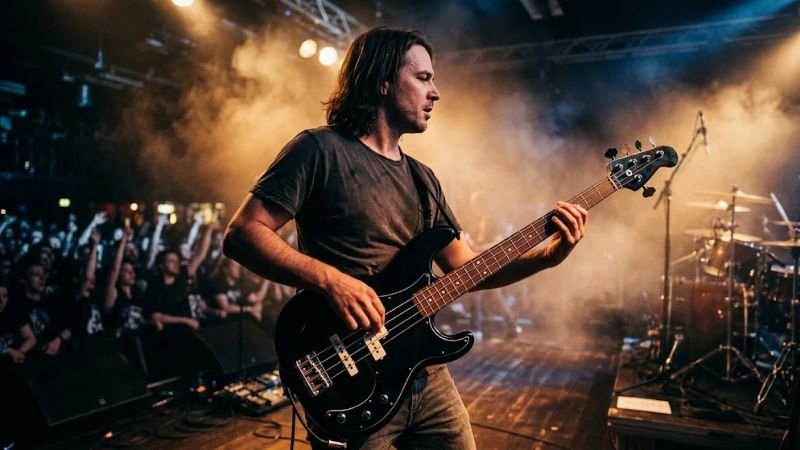
If you are a musician making album art or social posts, start with Midjourney or ChatGPT Images for strong visuals. If you run a gear blog or a small shop and care about clear licensing, Adobe Firefly is the safer route. If you need a consistent look across many images, Leonardo AI is worth a trial. If you love tinkering and want maximum control, learn Stable Diffusion or Flux with a reference image. If your design needs text, try Ideogram. And if you are only curious, use the free tiers of Gemini or other tools to find out what you like before paying.
A practical tip is to test the same prompt in two or three tools. Spend an hour comparing results and you will know which one fits your taste and your instrument-accuracy needs.
Frequently Asked Questions
What is the best AI bass guitar image generator for beginners? ChatGPT image generation and Gemini are the easiest to start with because you can describe what you want in plain language and fix mistakes by chatting. Adobe Firefly is also beginner-friendly if you like a simple web interface.
Which is the best AI bass guitar image generator for realistic results? For ready-to-use realism, ChatGPT Images and Midjourney are usually the strongest. For the highest accuracy of all, Stable Diffusion or Flux with ControlNet and a reference photo gives you the most control over proportions and string count.
Why does AI keep drawing the wrong number of strings? Models learn from far more six-string guitar images than bass images, so they tend to fall back to the pattern they know best. Specify “four-string” in the prompt, use a negative prompt for extra strings, and fix leftovers with inpainting.
Is there a free best AI bass guitar image generator? Yes. Several tools offer free daily credits or limited free generations, including Leonardo AI, Gemini and Ideogram. Free plans often have lower resolution, queues or tighter licensing, so check the terms before using images commercially.
Can I generate a specific brand’s bass model? You can describe a style, such as a Precision-style or Jazz-style bass, but exact brand logos and trademarked designs are risky and often rendered incorrectly. Use style descriptions and add your own branding if needed.
Can AI make images of a bassist playing? Yes, though hands and finger positions are still a weak spot. Wide shots, side angles and stage lighting hide small errors. Close-ups of the fretting hand usually need several tries or manual retouching.
Is it better to use AI or a real photo? Use AI for concept art, covers, thumbnails and social content. Use real photography when you are selling a specific instrument and the image must match the real product.
How do I make AI bass images look less generic? Add specific lighting, a clear mood, unusual locations and your own edits. Combining AI output with typography, color grading and a consistent visual style makes the final image feel original.
Conclusion
There is no single magic button, but there is a clear way to choose. For most people, ChatGPT image generation gives the best balance of accuracy and ease, Midjourney delivers the most striking artwork, Adobe Firefly is the safest for brand-conscious work, and Stable Diffusion or Flux rewards patient users with unmatched control. Whichever you pick, even the best AI bass guitar image generator is only as good as the prompt, the checks and the editing you add on top.
Start with a clear prompt that names a four-string bass, generate a handful of options, repair the details and keep your licensing notes. Do that, and you will get believable, professional bass guitar images in minutes instead of days. Try two tools side by side this week, and let your own results, not the hype, decide which one is the best AI bass guitar image generator for your workflow.