Updated October 2, 2026. The focus keyword reflects the original 2025 topic of this guide. Plans and prices below reflect what the official pages listed in early October 2026. We haven’t run classroom trials. Everything here comes from official documentation and pricing pages, and where we couldn’t confirm something officially, we say so.
Teachers and students keep asking the same thing: can an AI coding tool help me teach programming, or learn it, without starting from a blank file? It depends on which tool you pick and what you want students to understand by the end.
This guide to the Cursor AI Replit Bolt Lovable v0 Teaching Tools 2025 lineup compares five tools that all turn plain-English prompts into working code, but in different ways. One is a code editor, one is a browser-based workspace, and three are AI app builders made for fast prototyping. If you’re a teacher, a coding-club leader, or a self-taught beginner, the comparison below should help you match the right tool to the right lesson.
Whether you’re new to AI-assisted teaching or already experimenting, the Cursor AI Replit Bolt Lovable v0 Teaching Tools 2025 group covers the main approaches: an editor-based tool, a browser-based workspace, and app builders for rapid prototyping.
What Are These Five AI Coding Tools, and Are They Teaching Platforms?
They are not classroom platforms. They don’t come with gradebooks, lesson plans, or a built-in curriculum. They are AI-assisted coding and app-development tools that teachers and students can adopt for digital learning. Replit is the closest to education-ready, with a separate education hub.
In practice, “teaching tool” usually means one of these:
- Teacher-led demonstrations. Build a feature live in front of the class, then pull it apart.
- Worked examples. Generate a small program and ask students to explain, break, and fix it.
- App prototyping. Turn a project idea into something clickable in a single class period.
- Project-based learning. Let students iterate on their own app and defend their design choices.
The goal isn’t to let AI do the homework. It’s to give students more code to read, question, test, and improve.
That’s the most useful way to think about the Cursor AI Replit Bolt Lovable v0 Teaching Tools 2025 products when you plan a lesson.
Cursor AI Replit Bolt Lovable v0 Teaching Tools 2025 vs 2026: What Changed
Because the original focus was 2025, here is what’s historical and what’s current.
Historical (2025):
- Bolt started rolling over unused paid-plan tokens for one extra month on July 1, 2025.
- Vercel moved v0 to token-metered credits, replacing fixed message counts.
Current as of October 2026:
- Cursor says its student discount is no longer available. People who already redeemed it keep their rate until it expires.
- v0’s pricing documentation says the $20 Premium plan is being sunsetted and is closed to new users. Its $30 per user paid tier is now called Plus (it was previously called Team).
- Replit’s pricing page lists Core, Pro, and Enterprise paid tiers, plus a free Starter plan. We found no separate Teams tier.
Tool-by-Tool Breakdown
Here’s a closer look at each of the Cursor AI Replit Bolt Lovable v0 Teaching Tools 2025 products, what it does well, and where it can trip up a classroom.
Cursor AI: AI-Assisted Programming Inside a Code Editor
Cursor is a code editor with AI built in. You open a project folder and talk to an assistant about the files in front of you. It’s the most programmer-oriented of the five.
Two modes matter for teaching. Ask mode is read-only: the assistant answers questions and explores code without editing anything. Agent mode explores the codebase and makes changes across files, creating checkpoints so you can revert. Cursor’s quickstart suggests asking it to explain a codebase first, then reviewing the diff before you accept a change.
Classroom uses:
- Walking students through an unfamiliar multi-file project using Ask mode.
- Debugging and code explanation: paste an error, discuss what it means, then choose a fix.
- Code review exercises, where students critique what Agent mode produced.
- Teaching responsible AI use, including when to reject a suggestion.
Pros: read-only Ask mode is ideal for code explanation; Agent mode handles multi-file changes; free Hobby plan to try it.
Cons: assumes some coding comfort; free usage is limited; the student discount is discontinued.
Replit: Browser-Based Development for Classroom Projects
Replit runs entirely in the browser, which removes the biggest early obstacle in a coding class: installing software. It combines an editor, a running environment, and an AI Agent that can build and publish apps from prompts.
That makes it a natural fit for short exercises, live demos, and first projects. Replit’s education page says it’s “free for educators and students at top universities,” and its educator page says “free for educators at verified universities.” Neither says whether K–12 teachers qualify, so confirm before you plan a whole course around it.
Classroom uses:
- Starting small coding projects with zero local setup.
- Demonstrating a concept live, then sharing the project.
- Building a prototype for an assignment.
- Collaborating on a project. Per Replit’s billing docs, Core allows up to 5 collaborators and Pro up to 15.
Pros: no installation; Agent builds and publishes; education resources exist.
Cons: credit-based, with usage beyond your credits billed on top; the free Starter plan is limited to Lite build, and its one published app goes down after 30 days; K–12 eligibility is unclear.
Bolt.new: Prompt-Based Web Development and Rapid Prototyping
Bolt (at bolt.new) comes from StackBlitz. According to the project’s repository, it runs a development environment in your browser using StackBlitz’s WebContainers technology, so you can prompt, run, edit, and deploy without local setup.
Classroom uses:
- Rapid prototyping for a pitch or design assignment.
- Demonstrating web application concepts live.
- Building project mockups for the class to critique.
- Learning through iteration: change the prompt, test the result, compare.
Fast prototyping isn’t the same as learning to program. A student can generate a polished site in minutes without understanding it, so build in a step where they open the code and explain it.
Pros: browser-based with no setup; hosting included on every plan; free plan with public and private projects.
Cons: the free plan caps at 300K tokens a day with Bolt branding and a 10MB upload limit; Bolt’s own FAQ says larger projects use more tokens per message.
Lovable: AI App Building for Project-Based Learning
Lovable generates web applications from conversation. You describe the app, preview it, and refine it. Its documentation describes a Build mode that implements changes in your project, plus a code editor for manual edits that’s available on paid plans.
Two details matter to teachers. Lovable can sync code two-way with GitHub, GitLab, or Bitbucket, which suits lessons on version control. It also includes a built-in backend by default, with an optional Supabase connection.
Classroom uses:
- Turning a project idea into a working prototype.
- Exploring user interface design and user flow.
- Showing how an idea becomes a full application.
Pros: built-in backend; Git sync; a student discount of up to 50% off Pro for verified students.
Cons: the code editor is paid-only; Lovable’s credit system covers building, hosting, and AI features from one balance, so backend apps keep using credits; the free plan stops at 30 build credits a month.
v0: AI-Generated UI and Front-End Development
v0, from Vercel, is the most front-end-focused of the five. According to Vercel’s own guide to prototyping with v0, it generates React, Next.js, TypeScript, Tailwind CSS, and shadcn/ui by default. It can also work from screenshots and Figma designs. That makes it a good place to study front-end development and interface layout.
Classroom uses:
- Exploring UI design and page structure.
- Building front-end prototypes.
- Comparing generated components for readability or accessibility.
- Learning to refine an interface through prompts, then through direct code edits.
Pros: strong focus on user interface design; a free tier; a data opt-out on higher plans.
Cons: the free plan is limited to 7 messages a day plus $5 in monthly credits; the front-end focus means other services handle databases and logins; the Premium plan is closed to new users.
Comparison Table: Cursor AI Replit Bolt Lovable v0 Teaching Tools 2025
No row wins. The useful column is the one that matches your lesson.
| Tool | Main purpose | Typical workflow | Potential educational use | Coding knowledge needed | Important limitation |
|---|---|---|---|---|---|
| Cursor | AI code editor | Open a project, ask questions, review AI edits | Reading and debugging existing code | Moderate to high | Free usage is limited; beginners can feel lost |
| Replit | Browser workspace plus AI Agent | Prompt or code in the browser, then publish | First projects, live demos | Low to moderate | Credit-based; free publishing is limited |
| Bolt | Prompt-to-app in the browser | Describe an app, run it, publish | Rapid prototyping | Low | Token limits; speed can hide understanding |
| Lovable | Prompt-to-app builder | Chat, preview, refine, publish | Project prototypes, UI flow | Low | Code editor is paid-only; credit-based |
| v0 | UI and front-end generator | Prompt or upload a design, edit, export | UI design, front-end study | Low to moderate | Front-end focus; plans are changing |
Pros and Cons at a Glance
For a quick scan, here are the Cursor AI Replit Bolt Lovable v0 Teaching Tools 2025 pros and cons in one place.
| Tool | Biggest pros | Biggest cons |
|---|---|---|
| Cursor | Read-only code explanation; multi-file edits with checkpoints | Needs coding comfort; no standing student discount |
| Replit | No setup; Agent builds and publishes; education hub | Usage billed beyond credits; K–12 eligibility unclear |
| Bolt | In-browser environment; hosting on every plan | Daily token cap; branding on free sites |
| Lovable | Built-in backend; Git sync; student discount | Code editor paid-only; credits cover hosting too |
| v0 | Front-end and UI strength; data opt-out on higher plans | 7 free messages a day; narrow focus |
Which Tool Fits Your Class?
Each of the Cursor AI Replit Bolt Lovable v0 Teaching Tools 2025 options suits a different situation.
- Reading and editing existing code. Cursor’s Ask mode explains code without changing it, which suits this well.
- Introducing beginners to coding projects. Replit’s browser setup removes friction. Bolt and Lovable also work for beginners, as long as you add an explain-your-code step.
- Showing how web applications get made. Bolt and Lovable show the full arc from idea to published page. Pair either with a discussion of what the AI actually generated.
- Exploring UI and front-end design. v0 is the specialist. Students can compare layouts and see how interface changes map to code.
- Prototyping a class assignment. Any of the three app builders can do it. Credit limits and your school’s data privacy rules will probably decide which.
Benefits in Education

The benefits of the Cursor AI Replit Bolt Lovable v0 Teaching Tools 2025 group show up when teachers stay involved in every step.
Used carefully, these tools can offer:
- Faster project setup, so class time goes to thinking instead of installing.
- More hands-on practice, since students can attempt bigger projects.
- Modifiable examples the class can discuss and rework.
- Help understanding errors, by asking for an explanation instead of staring at a stack trace.
- Support for iterative design, where students refine a project in small steps.
Limitations and Responsible Classroom Use
Before you adopt any of the Cursor AI Replit Bolt Lovable v0 Teaching Tools 2025 products, it helps to know where they fall short.
AI-generated code can be wrong, inefficient, or insecure while sounding completely confident. Before adopting any of these tools, think through the following.
- Understanding. Students may accept answers they don’t understand. Require them to explain their code in their own words.
- Data privacy. Keep sensitive personal information out of prompts and generated apps. Vendor terms differ. For example, v0’s pricing documentation lists a data opt-out only on its Business and Enterprise plans. Read each vendor’s privacy policy and your school’s requirements. We make no claims about compliance with student-privacy laws.
- Age and account rules. Check each vendor’s terms of service for minimum ages before assigning accounts to students.
- Academic integrity. Set explicit rules for when AI help is allowed on each assignment.
- Changing plans. The past year proved it. Don’t build a semester around a free-tier feature. AI writing tools move just as quickly, as our roundup of AI writing tools updates in April 2026 shows.
- Supervision. Test generated projects before students rely on them. Nothing here proves AI tools automatically improve learning outcomes.
Are These Tools Suitable for Beginners?
Are the Cursor AI Replit Bolt Lovable v0 Teaching Tools 2025 products suitable for beginners?
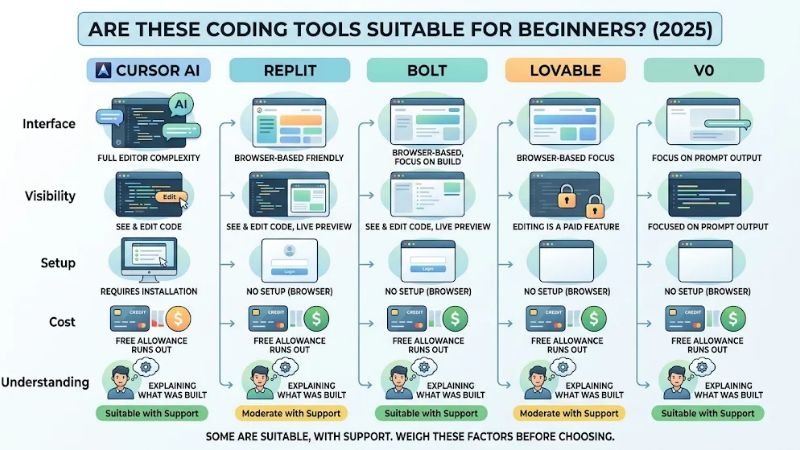
Some are, with support. Weigh the following:
- Interface complexity. Cursor is a full code editor. The others are friendlier.
- Code visibility. Can the student see and edit the code? On Lovable, editing is a paid feature.
- Setup. Browser-based tools like Replit and Bolt need none.
- Cost. Free allowances run out, sometimes within a single session.
- Understanding. Can the student explain what was built?
A few starting tips: begin with a tiny project, ask the AI to explain each change, change one thing yourself, and break something on purpose to see how it fails. It builds the habit of reading what the AI hands you.
Pricing and Free Plans (Verified October 2026)
Here is what the Cursor AI Replit Bolt Lovable v0 Teaching Tools 2025 tools cost for individual users.
Prices are in US dollars, as listed on each company’s pages in early October 2026. Plans change often, so confirm before buying. “Credits” and “tokens” are usage allowances, not dollar amounts.
| Tool | Free access | Paid individual plans | Education offer | Official page |
|---|---|---|---|---|
| Cursor | Hobby plan (free) | Pro $20/mo; Pro+ $60/mo; Ultra $200/mo. Teams $40/user/mo. Annual rates: see pricing page | Free student year discontinued; credits via events and a request form for graduate students, researchers, and educators | Pricing |
| Replit | Starter: daily Agent credits (Lite build only); one published app that goes down after 30 days | Core $20/mo monthly or $18/mo billed annually; Pro $100/mo or $90/mo billed annually | Education pages say free for educators and students at verified or top universities; K–12 unclear | Pricing |
| Bolt | Free: 300K tokens/day, 1M/month; Bolt branding; 10MB uploads | Pro $25/mo billed monthly (10M+ tokens, rollover); Teams $30/member/mo. Yearly billing saves up to 28% | None found | Pricing |
| Lovable | Free: 5 daily build credits (up to 30/month) plus 20 Cloud and 4 AI credits monthly | Pro from about $25/mo and Business from about $50/mo (confirm on the official page) | Verified students: up to 50% off Pro | Pricing, students |
| v0 | Free: 7 messages/day plus $5 monthly credits | Plus $30/user/mo; Business $100/user/mo; Premium $20/mo closed to new users | None found | Pricing docs |
Replit note: Replit’s docs say usage beyond your monthly credits is billed on top of the plan, so heavy Agent use costs more than the sticker price. Core includes $20 and Pro $100 in credits toward the most powerful models.
Frequently Asked Questions
These are the questions teachers ask most often about the Cursor AI Replit Bolt Lovable v0 Teaching Tools 2025 group.
Are these five tools still relevant in 2026? Yes, but plans and student offers have changed, so use the 2026 details above.
Which of the Cursor AI Replit Bolt Lovable v0 Teaching Tools 2025 options is best for a first-time teacher? Replit is the easiest starting point because it needs no setup. If you mainly want to read and explain existing code with students, Cursor’s Ask mode is the better fit.
Can teachers use Cursor AI to teach programming? Yes, especially for code explanation. Ask mode is read-only, which suits class discussion. Cursor assumes some coding comfort, so it fits older or more experienced students best.
Is Replit suitable for coding beginners? It can be. The browser-based setup avoids installation, and Replit publishes education resources. Check credit limits and whether your school qualifies for any educator offer.
Can Bolt.new and Lovable be used for student projects? Yes, for prototypes and project-based learning. Require students to explain how their app works, since both can produce results faster than students can understand them.
What is the difference between Lovable and v0? Lovable aims at complete applications and includes a built-in backend by default. v0 centers on user interface and front-end code, generally React and Next.js.
Do students need coding knowledge to use them? Not to start with Bolt, Lovable, or v0, but understanding improves with some knowledge. Cursor benefits from it most.
Are they free? All five have some free access, but limits are real: credits, tokens, or daily message caps. Paid individual plans start around $20 to $30 a month, with higher tiers above that.
How can teachers help students use AI-generated code responsibly? Set clear rules, require explanations, have students test and review generated code, and keep personal information out of prompts.
Conclusion
Cursor suits lessons about reading and debugging code. Replit offers browser-based practice with little setup. Bolt and Lovable turn ideas into working prototypes quickly, and v0 focuses on interface design and front-end code. The right pick from the Cursor AI Replit Bolt Lovable v0 Teaching Tools 2025 lineup depends on your learning objective, students’ experience, project type, privacy requirements, and budget.
Whatever you choose, keep students in the loop: have them read, test, and explain what the AI wrote. And because pricing and features move fast, confirm the details on the official pages before you commit a class to any of them.