
Anna AI Voice Computer is the search phrase many people use for Anna, an AI voice dictation app that turns speech into typed text inside the apps you already use. It suits people who write a lot on a computer, such as students, remote workers, writers, and creators, and anyone who wants a hands-free alternative to typing every word.
This guide covers what the Anna dictation app does, how its speech-to-text workflow runs, pricing, Windows availability, privacy questions, and alternatives. It is based on Anna’s public website and pricing page, not hands-on testing. It also keeps confirmed features separate from general voice AI capabilities that Anna has not been shown to offer.
Anna AI Voice Computer at a Glance
| What the official site says | |
|---|---|
| Type of tool | AI voice dictation (speech to typed text) |
| Platforms | Homepage names macOS and Windows; the visible download is for Mac (macOS 13 or later) |
| Price | Free plan available; Pro is listed at $7/month, billed $84/year |
| Account | Homepage says no account is required to download |
| Output | Typed text at your cursor; no spoken replies are described |
What Is Anna AI Voice Computer?
Anna describes itself as AI-powered voice dictation. You press a shortcut, speak naturally, and polished text appears anywhere you can type.
In practice, Anna is closer to voice dictation software than to a conversational voice assistant. It writes what you say. It is not described as answering questions aloud or running your computer.
Anna Voice Dictation vs Other “Anna” Voices
The name Anna is shared by many products. Some websites offer text-to-speech voice generators with an “Anna” voice, and other software companies use the same name for unrelated tools. Those are different from this dictation app. If you want voices that read text aloud, see our [AI Voice Generator Guide].
How Anna AI Voice Dictation Works
Anna describes a three-step voice typing flow:
- Press your shortcut. A custom keyboard shortcut starts Anna from any app.
- Speak naturally. You can pause or correct yourself without special commands.
- Text appears. Formatted text is typed where your cursor is, with punctuation, capitalization, and paragraph formatting handled for you.
Behind that flow sit the usual stages of voice AI: audio capture, speech recognition, AI editing, and text output. Anna’s website does not detail how each stage runs, so this guide does not either. For the general difference between converting speech to text and text to speech, see [Speech-to-Text vs Text-to-Speech Explained].
Anna AI Voice Computer Features
Features Confirmed on Anna’s Website
- Shortcut activation: starts listening from any app on your Mac.
- Works where you type: the site says text appears anywhere you can type.
- AI auto edits: removes filler words, fixes spelling, and handles punctuation, capitalization, and paragraph formatting.
- Personal dictionary: lets you add names, company terms, and technical jargon. The pricing page lists the custom dictionary under Pro, so it may not be part of the free plan.
- Automatic language detection: the homepage says 100+ languages, while the pricing page lists 90+ for the free plan, so check which number applies to you.
- Style profiles: one on the free plan and unlimited on Pro, according to the pricing page.
- Local on-device processing: the pricing page lists this for the Free plan. See the privacy section below for what is and is not confirmed.
General Voice AI Features Not Confirmed for Anna
Spoken replies, voice commands that open apps or control settings, and question-and-answer conversations are common in other voice tools. Anna’s homepage and pricing page do not list them, so do not assume the Anna app offers them.
Anna AI Voice Computer Pricing
Anna’s pricing page lists three plans. Prices and limits can change, so confirm them on the official pricing page before you decide.
| Plan | Price | Key details listed |
|---|---|---|
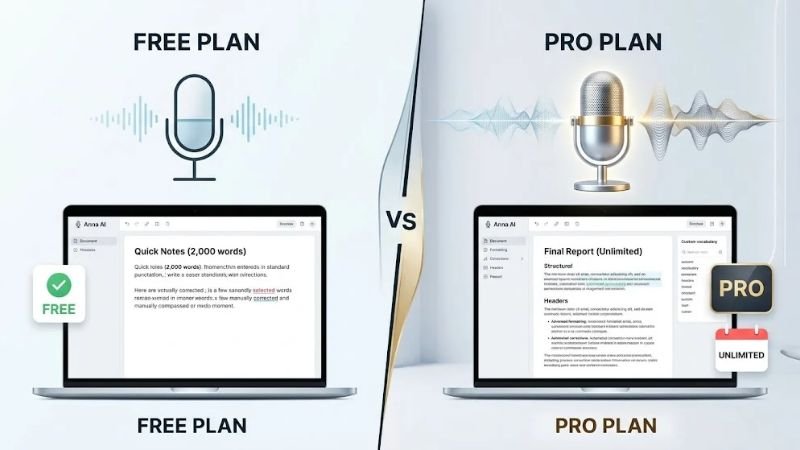
| Free | $0 | 2,000 words per week, basic AI formatting, 1 style profile, macOS app, 90+ languages, local on-device processing |
| Pro | $7/month, billed $84/year | 7-day free trial, unlimited words, advanced AI formatting, unlimited style profiles, custom dictionary, priority support, advanced punctuation controls |
| Team (5+) | Custom pricing | Everything in Pro plus a management dashboard, shared style profiles, usage analytics, SSO, and volume discounts |
An older post on Anna’s own blog cites different free-word limits and a different Pro price. When numbers conflict, treat the current pricing page as the reference. The pricing page also mentions a lifetime plan in its FAQ, but this guide could not verify its terms.
Does Anna Work on Windows?
The answer is not fully clear from the pages reviewed:
- The homepage says Anna is available for macOS and Windows.
- The download button shown on the homepage is “Download for Mac,” with macOS 13 or later required.
- The free plan on the pricing page lists a “macOS app.”
Windows is named, but a Windows download and its features were not confirmed here. Check the official download page for current Windows availability before you plan around it, and do not assume Windows matches the Mac version. If you need a Windows option right now, see the alternatives below.
How to Use Anna AI Voice Computer
Steps can change between versions, so treat this as a general outline:
- Check compatibility. Confirm your operating system on the download page.
- Download from the official site, not third-party download sites.
- Grant permissions. Voice tools generally need microphone access, and your system will show its own prompts.
- Set your shortcut, and pick one that does not clash with other apps.
- Test in a simple text field. Dictate a few sentences to see how it handles pauses and punctuation.
- Add vocabulary if your plan includes the dictionary.
Common Use Cases for Anna AI Voice Computer
- Email and messages: speak a rough thought and let the AI tidy it.
- Drafting and brainstorming: capture first drafts without stopping to edit, which can make dictation useful for writers.
- Notes and documentation: dictate follow-ups and updates right after a meeting. For more writing workflows, see [AI Productivity Tools for Writers].
- Study and coursework: dictation for students may help with notes and first drafts.
- Accessibility: people who find typing tiring may benefit. Anna’s site includes testimonials on this, but they are personal experiences, not clinical evidence.
- Multilingual writing: automatic language detection may help, though results will vary by language and accent.
Benefits and Limitations of Anna AI Voice Computer
Benefits
- Speed potential: speaking is often faster than typing. Anna’s site shows speed and accuracy figures, but they are vendor claims, so test them yourself.
- Low friction: a shortcut makes it easier to capture ideas as they come.
- Less cleanup: AI editing is described as handling filler words, spelling, and punctuation, which can reduce manual fixes.
- Works across apps: spoken text lands wherever your cursor is, so you do not need to switch tools.
- Free way to try it: the free plan lets Mac users test dictation within its weekly limit.
Limitations
- Recognition errors: accents, uncommon names, and technical terms can still be misheard.
- Audio quality: background noise and weak microphones can reduce accuracy.
- Meaning changes: AI edits can alter what you meant, so proofread important text.
- Plan limits: free-plan limits apply, and some features sit behind Pro.
- Scope: dictation is not designed for controlling your computer or hearing spoken answers.
- Unconfirmed details: Windows availability and some privacy details are not confirmed, as covered in the sections above and below.
Anna AI Privacy and Voice Data
Voice tools listen to you, so read the privacy details before installing one. What is confirmed is limited:
- The pricing page lists “local on-device processing” among the free plan’s features.
- The homepage links a privacy policy and terms.
- One testimonial says everything stays on the user’s Mac, and an older Anna blog post makes a similar claim. These are marketing and customer statements, not a policy guarantee.
What is not confirmed here is whether Pro uses the same processing, whether audio or transcripts are stored or sent anywhere, how long data is kept, and whether an internet connection is needed. This guide could not access the text of Anna’s own privacy policy. Several unrelated products called Anna have their own policies, so make sure you read the one on the dictation app’s official site.

In the United States, no single federal law covers every app, though states such as California give residents specific data rights. If you work in healthcare, law, or finance, ask whether the tool meets your compliance obligations, such as HIPAA, before dictating client or patient details. A physician’s testimonial on Anna’s site is not a compliance statement. For a broader checklist, see our [AI Privacy and Data Safety Guide].
Anna AI Voice Computer vs Traditional Voice Assistants
| Anna dictation app | Traditional voice assistant | |
|---|---|---|
| Main job | Convert speech into polished text | Answer questions and run simple commands |
| Output | Text typed into your app | Spoken replies, app actions, device control |
| Interaction | Shortcut, then speak | Often a wake word |
| Best for | Writing, notes, email | Timers, quick lookups, smart-home tasks |
Neither is universally better. Many people use both.
Anna AI Alternatives
- Built-in macOS dictation: already on your Mac and a natural baseline to compare against.
- Voice typing in Windows: a built-in option for Windows users, especially while Anna’s Windows availability is unclear.
- Other AI dictation apps: many exist, but this guide does not compare them because no verified comparison was available. See [Best AI Dictation Software] for options.
- Traditional voice assistants: better suited to spoken answers and quick commands.
- Keyboard typing: a familiar option for precise, sensitive text.
Who Should Use Anna AI?
- Students can capture notes and drafts.
- Professionals and remote workers can speed up email and documentation.
- Creators may use it for scripts and captions.
- People who find typing uncomfortable may value a lower-effort input method.
- Mac users who want to test dictation without paying can start with Anna’s free plan, within its limits.
If you need spoken answers or computer control, or you are on Windows and cannot confirm a download, another tool may fit better.
Anna AI Voice Dictation Tips
- Speak in complete thoughts so the AI has context.
- Use a decent microphone in a quiet space.
- Build your dictionary with names, brands, and jargon, if your plan includes it.
- Dictate section by section instead of an entire document at once.
- Proofread names, numbers, and dates, and verify factual claims.
Frequently Asked Questions
What is Anna AI Voice Computer?
It is a search phrase associated with Anna, an AI voice dictation app that types your speech into the apps you use.
Is Anna AI Voice Computer free?
There is a free plan with 2,000 words per week, per the pricing page. Pro is listed at $7/month billed $84/year, with a 7-day free trial. Check the pricing page for current terms.
How much does Anna AI cost?
The free plan costs $0. Pro is listed at $7/month, billed $84/year. Team pricing (5+ users) is custom. An older blog post cites different numbers, so treat the current pricing page as the reference.
Does Anna AI work on Windows?
The homepage names Windows, but the visible download is for Mac (macOS 13 or later). Confirm Windows availability on the official download page.
Does Anna AI Voice Computer work offline?
The pricing page lists local on-device processing for the free plan. Whether that applies to every plan, and whether any internet connection is needed, is not confirmed here. Check the official privacy policy and documentation.
Is Anna AI private and safe?
It depends on how your data is handled. Review microphone permissions and the official privacy policy, and avoid dictating sensitive information until you have checked.
What does Anna AI use voice dictation for?
Anna turns speech into typed text for email, messages, drafts, notes, and documentation, with AI editing for filler words, spelling, punctuation, and paragraphs.
Can Anna AI control your computer or talk back?
Anna’s website describes dictation, not computer control or spoken replies.
What are the alternatives to Anna AI?
Built-in dictation in macOS or Windows, other AI dictation apps, traditional voice assistants, and keyboard typing.
Conclusion
Anna AI Voice Computer points to a dictation app built for turning speech into clean, typed text, with AI editing, a personal dictionary on Pro, style profiles, and automatic language detection. The free plan makes it easy to try on a Mac within its weekly limit.