
Running a small team feels a lot like juggling — you’re wearing five hats, answering client emails, chasing invoices, updating spreadsheets, and somehow still trying to grow the business. If that sounds familiar, you’ve probably already heard the buzz around llm agents workflow automation small team productivity solutions. And no, this isn’t just another AI hype train. For lean teams with limited headcount and even more limited time, this shift is turning out to be one of the most practical productivity upgrades in years.
In this guide, we’ll break down what LLM agents actually are, how they’re different from basic chatbots, why small teams in particular are seeing outsized gains, and how to realistically implement AI-powered workflow automation without hiring a data science team. We’ll also cover the pros and cons, a comparison table of popular tools, real examples, and answer the most common questions founders and operations leads are asking right now.
What Are LLM Agents, Really?
LLM stands for Large Language Model — the technology behind tools like GPT-4, Claude, and Gemini. An “agent” built on top of an LLM isn’t just a chatbot that answers questions. It’s a system that can reason through a task, break it into steps, call other tools or APIs, remember context, and take action on its own — with minimal human hand-holding.
Think of it this way: a chatbot answers “What’s our refund policy?” An LLM agent, on the other hand, can read an incoming customer email, check the order database, decide the customer qualifies for a refund, process it, and send a confirmation — all without a human clicking a single button.
This distinction matters a lot when we talk about workflow automation for small teams. Traditional automation tools (think Zapier or basic scripts) follow rigid “if this, then that” logic. LLM agents add a layer of judgment and adaptability that rule-based automation simply can’t match, which is exactly why interest in intelligent agent-based automation has grown so quickly over the past year.
Why Small Teams Are the Real Winners Here

Big enterprises have always had automation — expensive, custom-built systems maintained by dedicated engineering teams. Small businesses never had that luxury. That’s exactly what’s changing now.
Here’s why llm agents workflow automation small team productivity has become such a hot topic among startups, agencies, and small businesses:
- Lower cost of entry: You no longer need a six-figure automation budget. Many agent platforms cost less than a single employee’s monthly coffee budget.
- No dedicated engineering team required: Modern no-code and low-code agent builders let non-technical founders set up powerful workflows.
- Faster decision-making: Agents can triage, prioritize, and route tasks in real time, cutting down the back-and-forth that eats up a small team’s day.
- Scalability without hiring: When client volume doubles, you don’t necessarily need to double your team — agents absorb repetitive work instantly.
- Round-the-clock operations: Unlike your team, agents don’t sleep, take lunch breaks, or need weekends off.
For a five-person startup competing against companies with fifty employees, this is a genuine equalizer.
Common Use Cases for LLM Agents in Small Business Workflows
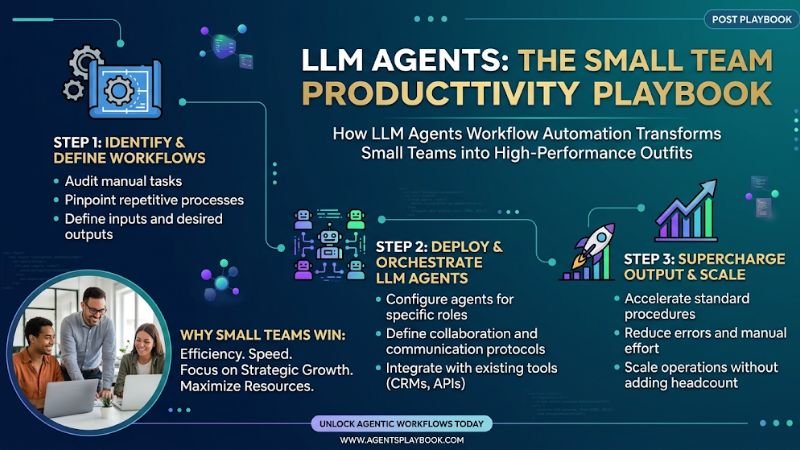
Let’s get concrete. Where exactly are small teams plugging llm agents workflow automation small team productivity strategies in?
1. Customer Support Triage
Instead of a human reading every incoming ticket, an agent categorizes tickets, drafts responses, escalates urgent issues, and even resolves simple queries independently.
2. Sales Lead Qualification
Agents can scan inbound leads, cross-reference CRM data, score leads by intent, and automatically schedule calls for the sales-qualified ones — freeing reps to focus only on high-value conversations.
3. Content and Marketing Operations
From drafting first versions of blog posts to repurposing long-form content into social snippets, agents handle the repetitive first 70% of content work so your team can focus on polish and strategy.
4. Internal Knowledge Management
Agents connected to your internal docs, Slack, or Notion can instantly answer “how do we handle refunds” or “what’s our onboarding checklist” — cutting down on internal interruptions.
5. Finance and Admin Tasks
Invoice generation, expense categorization, and payment follow-ups are increasingly handled end-to-end by finance-focused agents.
6. Project and Task Coordination
Agents that sit inside project management tools can automatically reassign overdue tasks, summarize standups, and flag bottlenecks before they become deadline emergencies.
7. HR and Recruitment Screening
Small teams without a dedicated HR department can use agents to screen incoming resumes, shortlist candidates against role requirements, and schedule interviews automatically, saving hours during every hiring cycle.
These aren’t hypothetical use cases — they’re already live inside thousands of small businesses right now, quietly reshaping daily operations through practical agent-based workflow setups.
A Real-World Scenario: How a 6-Person Agency Used This
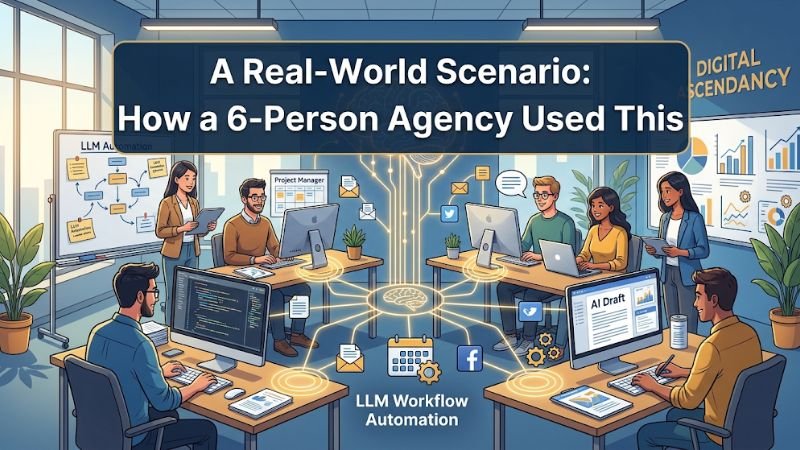
Consider a small digital marketing agency with just six employees. Before adopting agent-based automation, one team member spent nearly two hours every morning manually sorting client emails, tagging urgent requests, and forwarding them to the right person. After setting up a simple LLM agent connected to their inbox and project management tool, that entire triage process dropped to a five-minute daily review.
The agency then expanded the same approach to lead qualification and monthly reporting. Within two months, the team estimated they had reclaimed roughly 15 hours per week collectively — time they reinvested into client strategy calls and business development instead of administrative busywork. This is a fairly typical outcome for teams that approach agent-driven automation methodically rather than trying to automate everything overnight.
LLM Agents Workflow Automation Small Team Productivity: The Mechanics

It’s worth digging a little deeper into the mechanics of why this works so well for smaller teams specifically.
Reduced context-switching. Small team employees often juggle multiple roles. Every time someone switches from writing code to answering a support ticket to updating a spreadsheet, they lose focus and time. Agents absorb the low-value, high-frequency tasks, letting humans stay in flow.
Faster onboarding of new processes. Instead of writing a 10-page SOP document that nobody reads, you can often just describe the workflow to an agent once, and it executes consistently every time.
Fewer dropped balls. Small teams don’t have the redundancy of large teams. If one person forgets to follow up on a lead, there’s no backup layer catching it. Agents don’t forget.
Compounding time savings. A single automated workflow might save only 20 minutes a day. But when you multiply that across five, ten, or twenty workflows running simultaneously, you’re looking at multiple reclaimed hours per employee, per week.
This is the real value behind intelligent automation and AI-driven task management — it’s not about replacing your team, it’s about removing the friction between your team and the actual high-value work they were hired to do. Teams that invest early in this kind of intelligent automation tend to compound these gains faster than teams that wait.
Pros and Cons of LLM Agent Automation for Small Teams
No solution is perfect, and it’s important to go in with realistic expectations before fully committing to llm agents workflow automation small team productivity systems. Here’s a balanced look.
Pros
- Significant time savings on repetitive, rules-based tasks
- Lower operational costs compared to hiring additional staff
- 24/7 availability for customer-facing and internal processes
- Faster scaling without proportional headcount growth
- Improved consistency — agents don’t have off days or memory lapses
- Easy integration with existing tools like Slack, Gmail, Notion, and CRMs
- Data-driven insights generated as a byproduct of automated workflows
Cons
- Upfront setup time — workflows need to be mapped out and tested before they run smoothly
- Occasional errors or “hallucinations” — agents can misinterpret ambiguous instructions
- Over-reliance risk — teams may under-monitor agents once trust builds up
- Data privacy concerns — sensitive information needs careful handling and access control
- Learning curve for non-technical team members unfamiliar with prompt design
- Ongoing maintenance — workflows need occasional tweaks as business processes evolve
The takeaway: LLM agents dramatically boost small team productivity, but they work best as a co-pilot with human oversight, not a fully autonomous replacement — at least for now.
Comparison Table: Popular LLM Agent Platforms for Small Teams
| Platform | Best For | No-Code Friendly | Integration Options | Pricing Tier |
|---|---|---|---|---|
| Claude (Cowork/Projects) | General knowledge work, document tasks, research | Yes | Google Drive, Slack, browser tools | Free–Paid tiers |
| Zapier + AI Agents | Simple multi-app automation | Yes | 6,000+ apps | Free–Paid |
| Make (Integromat) | Complex, visual workflow automation | Moderate | Wide app ecosystem | Free–Paid |
| Microsoft Copilot Studio | Teams already on Microsoft 365 | Moderate | Outlook, Teams, SharePoint | Paid |
| Custom GPT/Agent builds (API-based) | Highly specific, custom workflows | No (dev needed) | Any API | Usage-based |
| Notion AI Agents | Internal knowledge and task management | Yes | Notion ecosystem | Paid add-on |
Choosing the right platform is a critical step in any llm agents workflow automation small team productivity plan, since the wrong tool can create more manual work than it saves.
This table isn’t exhaustive, but it reflects the tools small teams most commonly evaluate when researching AI agent automation platforms in 2026.
How to Get Started Without Overwhelming Your Team
If this all sounds appealing but a little intimidating, here’s a simple, low-risk way to begin your own llm agents workflow automation small team productivity journey:
- Pick one repetitive process — something your team does the same way, multiple times a week (e.g., responding to common support questions).
- Map the steps in plain language, exactly as a human would do them.
- Choose a beginner-friendly platform — no-code tools are ideal for a first attempt.
- Test with real but low-stakes data before letting the agent run unsupervised.
- Review outputs weekly for the first month to catch errors early.
- Expand gradually — once one workflow runs smoothly, automate the next bottleneck.
Trying to automate everything at once is the single most common mistake small teams make. Start narrow, build trust in the system, then scale into a fuller automation strategy.
Measuring the ROI of Agent-Based Automation
One question small business owners often skip is how to actually measure whether their llm agents workflow automation small team productivity investment is working. A few practical metrics worth tracking:
- Hours saved per week, tracked manually for the first month before and after automation
- Response time improvements on customer support or sales inquiries
- Error rate in tasks previously prone to human oversight, like data entry
- Employee satisfaction, since removing tedious work often boosts morale and retention
- Cost per task, comparing the automation platform’s subscription cost against the equivalent hours of manual labor saved
Tracking even two or three of these consistently gives you a clear, data-backed picture of whether your automation investment is paying off, rather than relying on a vague sense that “things feel faster now.”
The Human Element: What Agents Should Never Replace
It’s tempting to get carried away and automate every touchpoint in your business through llm agents workflow automation small team productivity systems. But small teams thrive on relationships — with customers, with each other, with their community. Agents are excellent at handling volume and repetition, but judgment calls involving empathy, nuance, or high-stakes decisions should still land on a human’s desk.
The most successful small teams using AI-driven automation treat it as a force multiplier for their people, not a replacement for them. The goal isn’t fewer humans — it’s humans spending their time on the things only humans can do well.
Frequently Asked Questions
Q1: Are LLM agents expensive to implement for a small business? Not necessarily. Many platforms offer free or low-cost tiers that are more than sufficient for a small team’s first few workflows. Costs typically scale with usage, not headcount, which makes it manageable even on a tight budget.
Q2: Do I need a technical background to set up LLM agent workflows? No. Most modern platforms are designed with no-code interfaces specifically so non-technical founders and operations staff can build and manage workflows without writing code.
Q3: Is it safe to give an LLM agent access to sensitive business data? It can be, as long as you follow best practices — limiting access permissions, using platforms with strong data privacy policies, and avoiding feeding highly sensitive information into workflows unless the platform explicitly supports secure handling.
Q4: How long does it take to see productivity results? Most small teams report noticeable time savings within the first two to four weeks, especially on high-frequency tasks like email triage or lead qualification.
Q5: Can LLM agents completely replace employees in a small team? Generally, no — and that shouldn’t be the goal. Agents are best used to eliminate repetitive, low-judgment work so your existing team can focus on strategy, relationships, and growth.
Q6: What’s the biggest mistake small teams make with workflow automation? Trying to automate too much, too fast, without testing. Starting with one well-defined process and expanding gradually leads to far better long-term results.
Q7: Which industries benefit most from this kind of automation? Service-based businesses — agencies, consultancies, e-commerce stores, and SaaS startups — tend to see the fastest returns, since much of their daily work involves repetitive communication and data handling that agents excel at.
Q8: Is now a good time to start with llm agents workflow automation small team productivity strategies? Yes. The tools have matured significantly, prices have dropped, and no-code platforms mean even a solo founder can set up a working agent within an afternoon. Waiting mainly means falling behind competitors who are already automating.
Conclusion
The conversation around llm agents workflow automation small team productivity isn’t just tech hype — it’s a genuine shift in how small businesses compete. What used to require large teams and big budgets can now be handled by a handful of people supported by intelligent, adaptable automation. The teams winning with this approach aren’t the ones automating everything overnight; they’re the ones who start small, pick the right platform, keep a human in the loop, and expand thoughtfully.
If your small team is still buried under repetitive admin work, chasing leads manually, or answering the same support questions over and over, there’s a good chance an LLM agent could reclaim hours of your week almost immediately. The technology has matured enough, the tools have become accessible enough, and the only real question left is which workflow you’ll automate first.
